Using the ReferenceArea Class
The ReferenceArea class is used in conjunction with the Chart class to display bands of color to be drawn with the chart based on numeric values along a chart axis. For each band of color, you would create a separate instance of the ReferenceArea class.
Creating Reference Areas Using the ReferenceArea Class
The essential steps to use the ReferenceArea class are:
-
Create an instance of the ReferenceArea class in PeopleCode by using the GetReferenceArea built-in function:
&ref1 = GetReferenceArea(); -
Set the properties on the instance of ReferenceArea class that you created.
-
Add the instance to an array of ReferenceArea instances:
&ref_areas = CreateArray(&ref1);Note:
For each band of color, you would add a separate instance of the ReferenceArea class to this array.
-
Pass the array into the SetReferenceArea method of the Chart class:
&cChart.SetReferenceArea(&ref_areas);
Using Reference Areas with Charts
To produce a bar chart similar to the following example that displays a reference area, you would create two instances of the ReferenceArea class:
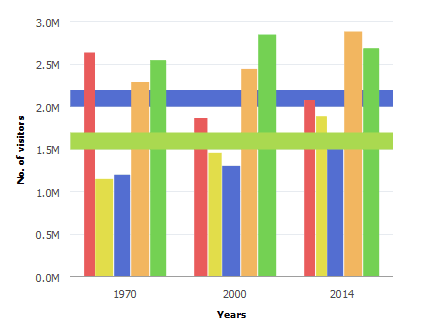
While it is not required, you could create a user-defined PeopleCode function that returns the array of reference areas.
Function bld_ref_areas Returns array;
   &ref1 = GetReferenceArea();
   &ref1.Association = %Ref_Association_Y1;
   &ref1.Description = "1 STD from Mean";
   &ref1.ShortText = "Ref Area1";
   &ref1.IsDisplayedTextInLegend = True;
   &ref1.ReferenceAreaColor = %ChartColor_Yellow;
   &ref1.ReferenceAreaValues = CreateArray(50000, 30000);
   &ref_areas = CreateArray(&ref1);
   Return &ref_areas;
End-Function;
Then, you associate the array returned by this function to the instance of Chart class using the SetReferenceArea method:
&cChart.SetReferenceArea(bld_ref_areas());