Using the ReferenceLine Class
The ReferenceLine class is used in conjunction with the Chart class to display colored lines to be drawn with the chart based on numeric values along a chart axis. For each reference line, you would create a separate instance of the ReferenceLine class.
Creating Reference Lines Using the ReferenceLine Class
The essential steps to use the ReferenceLine class are:
-
Create an instance of the ReferenceLine class in PeopleCode by using the GetReferenceLine built-in function:
&refln1 = GetReferenceLine(); -
Set the properties on the instance of ReferenceLine class that you created.
-
Add the instance to an array of ReferenceLine instances:
&ref_lines = CreateArray(&refln1);Note:
For each reference line, you would add a separate instance of the ReferenceLine class to this array.
-
Pass the array into the SetReferenceLine method of the Chart class:
&cChart.SetReferenceLine(&ref_lines);
Using Reference Lines with Charts
To produce a chart similar to the following example that displays a reference line, you would create two instances of the ReferenceLine class:
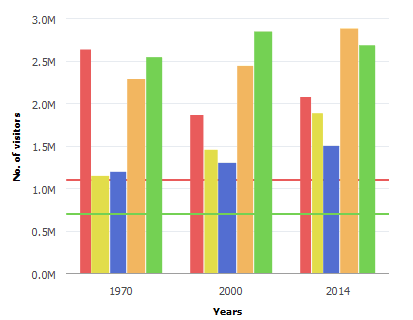
While it is not required, you could create a user-defined PeopleCode function that returns the array of reference lines.
Function bld_ref_lines() Returns array;
   &refln1 = GetReferenceLine();
   &refln1.Association = %Ref_Association_Y1;
   &refln1.Description = "Average";
   &refln1.ShortText = "Avg";
   &refln1.IsDisplayedTextInLegend = False;
   &refln1.ReferenceLineLocation = %Ref_Back;
   &refln1.ReferenceLineColor = %ChartColor_Red;
   &refln1.ReferenceLineValue = CJY_CHRT_REF_WK.CJY_AMT;
   &reflines = CreateArray(&refln1);
   Return &reflines;
End-Function;
Then, you associate the array returned by this function to the instance of Chart class using the SetReferenceLine method:
Function bld_chrt();
   &cChart = GetChart(CJY_CHRT_REF_WK.CJY_CHRT1);
   &cChart.Reset();
   &cChart.SetData(Record.CJY_SLRY);
   &cChart.SetDataXAxis(CJY_SLRY.CJY_NM);
   &cChart.setDataYAxis(CJY_SLRY.CJY_SLRY);
   &cChart.SetReferenceLine(bld_ref_lines());
End-Function;