Building HTML Tree Pages
The page you use to display the HTML tree must contain:
-
An HTML area used to display the HTML tree.
-
A character field that has a page field name, is at least 46 characters long, and is invisible.
Note:
The edit box should be invisible, but not display-only. An invisible edit box cannot be seen by the user, but it still has a buffer that can be written to. Page fields that have been specified as invisible do not need to be marked as Modifiable from HTML unless they are located on a page that is not active when GenerateTree is called. For example, if your application calls GenerateTree from one page and then saves the result in a field that is displayed by an HTML area on another page in the component, the associated event field must be marked both Invisible and Modifiable from HTML.
Events are sent to the application from the HTML tree using the invisible field. The events are processed by FieldChange PeopleCode that is attached to the invisible field.
This is an example page for an HTML tree:
This example illustrates the fields and controls on the Example of PeopleSoft Application Designer HTML tree page. You can find definitions for the fields and controls later on this page.
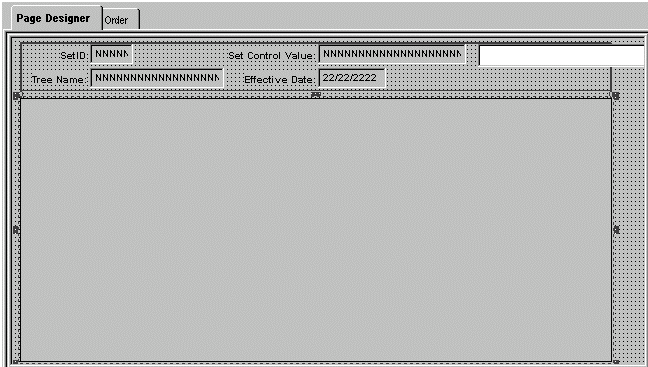
The large area that is selected in the example is the HTML area that displays the HTML tree. The HTML area is attached to the DERIVED_HTML.HTMLAREA field for this example.
The white edit box is the invisible field used to pass events from the HTML tree to the application. It is attached to the DERIVED_HTML.TREECTLEVENT field for this example.
The edit box must have a page field name. In this example, the page field name is TREECTLEVENT.