Understanding HTML Trees
Use the GenerateTree function to display data in a tree format. The result of the GenerateTree function is an HTML string, which can appear in an HTML area control. The tree generated by GenerateTree is called an HTML tree.
The GenerateTree function displays data from a rowset. You can populate this rowset using existing record data. You can also use the tree classes to display data from trees created using PeopleSoft Tree Manager.
To use this function, you must set up a page for displaying the data and populate a standalone rowset with the data to be displayed.
The following example shows an HTML tree. This is used to display data in tree format using GenerateTree function.
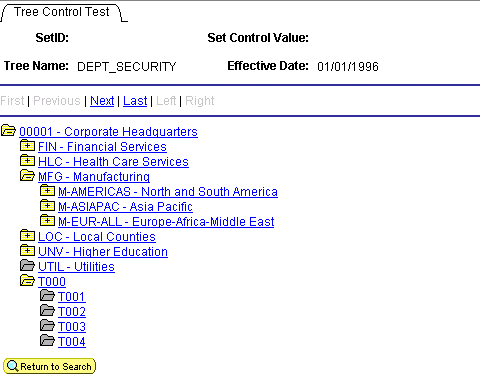
The positional links at the top of the page (First, Previous, Next, Last, Left, Right) enable the user to navigate around the tree. These links are automatically generated as part of the execution of GenerateTree.
When a node is collapsed, a plus sign appears on the node icon, and the node's children are hidden. When a node is expanded, all child nodes appear, and the icon displays a minus sign. Icons without a plus or minus sign are terminal nodes, which have no children and cannot be expanded or collapsed.