Data Buffer Hierarchy Examples
The following EMPLOYEE_CHECKLIST image is an example of data buffer hierarchy.
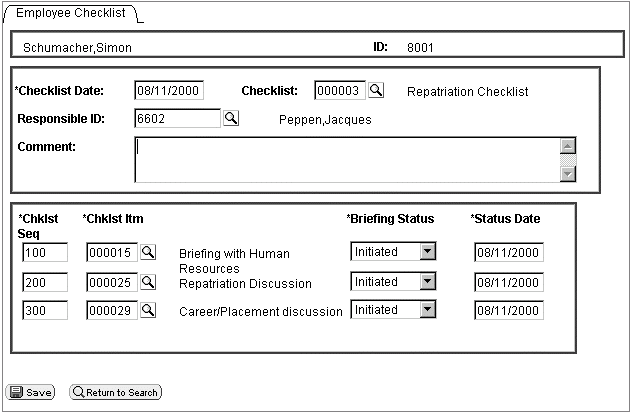
Suppose you want to access the BRIEFING_STATUS field at level two of the following page:
First, determine where your code is running. For this example, the code is starting at a field on a record at level zero. However, you do not always have to start at level zero.
If you start with level zero, you must traverse the data hierarchy, through the level one rowset to the level two rowset, before you can access the record that contains the field.
Obtaining the Rowset
You first obtain the level zero rowset, which is the PERSONAL_DATA rowset. You do not need to know the name of the level zero rowset to access it:
&LEVEL0 = GetLevel0();Obtaining Rows
The next object to get is a row. As the following code is working with data that is loaded from a page, only one row is at level zero. However, if you have rowsets that are populated with data that is not based on component buffers (for example, an application message), you may have more than one row at level zero.
&LEVEL0_ROW = &LEVEL0(1);Obtaining Child Rowsets
To obtain the level two rowset, traverse through the level one rowset first. Therefore, the next object to get is the level one rowset, as shown in the following example:
&LEVEL1 = &LEVEL0_ROW.GetRowset(SCROLL.EMPL_CHECKLIST);Obtaining Subsequent Rows
If you are traversing a page, obtain the appropriate row after you get a rowset. To process all the rows of the rowset, set this functionality up in a loop, as shown in the following example:
For &I = 1 to &LEVEL1.ActiveRowCount
   &LEVEL1_ROW = &LEVEL1(&I);
   . . .
End-For;
Obtaining Subsequent Rowsets and Rows
Traverse another level in the page structure to access the second level rowset, and then use a loop to access the rows in the level two rowset.
Because we are processing all the rows at level one, we are just adding code to the previous For loop. As we process through all the rows at level two, we are adding a second For loop. The new code is in bold in the following example:
For &I = 1 to &LEVEL1.ActiveRowCount
   &LEVEL1_ROW = &LEVEL1(&I);
   &LEVEL2 = &LEVEL1_ROW.GetRowset(SCROLL.
EMPL_CHKLST_ITM);
   For &J = 1 to &LEVEL2.ActiveRowCount
      &LEVEL2_ROW = &LEVEL2(&J);
   . . .
   End-For;
End-For;
Obtaining Records
A row always contains a record, and it may contain only a child rowset, depending on how your page is set up. GetRecord is the default method for a row, so all you have to specify is the record name.
Because we are processing all the rows at level two, we just add code to the For loops of the previous example. The new code is in bold:
For &I = 1 to &LEVEL1.ActiveRowCount
   &LEVEL1_ROW = &LEVEL1(&I);
   &LEVEL2 = &LEVEL1_ROW.GetRowset(SCROLL.EMPL_CHKLST_ITM);
   For &J = 1 to &LEVEL2.ActiveRowCount
      &LEVEL2_ROW = &LEVEL2(&J);
      &RECORD = &LEVEL2_ROW.EMPL_CHKLST_ITM;
   . . .
   End-For;
End-For;
Obtaining Fields
Records are made up of fields. GetField is the default method for a record, so all you have to specify is the field name.
Because we are processing all the rows at the level one, we are just adding code to the For loops of the previous example. The new code is in bold:
For &I = 1 to &LEVEL1.ActiveRowCount
   &LEVEL1_ROW = &LEVEL1(&I);
   &LEVEL2 = &LEVEL1_ROW.GetRowset(SCROLL.EMPL_CHKLST_ITM);
   For &J = 1 to &LEVEL2.ActiveRowCount
      &LEVEL2_ROW = &LEVEL2(&J);
      &RECORD = &LEVEL2_ROW.EMPL_CHKLST_ITM;
      &FIELD = &RECORD.BRIEFING_STATUS;
      /* Do processing */
   End-For;
End-For;
Using Shortcuts
The previous code is the long way of accessing this field. The following example uses shortcuts to access the field in one line of code. The following code assumes all rows are level one:

Here’s another method of expressing the code:
| Object Type | Code |
|---|---|
|
|
|
|
|
|
|
|
|
|
|
|
|
|
|
|
|
|
|
|
|
|
|
|
|