Employee Checklist Page Structure
Most of the examples in this section use the Employee Checklist page.
The following image illustrates a structure in a Employee Checklist page.
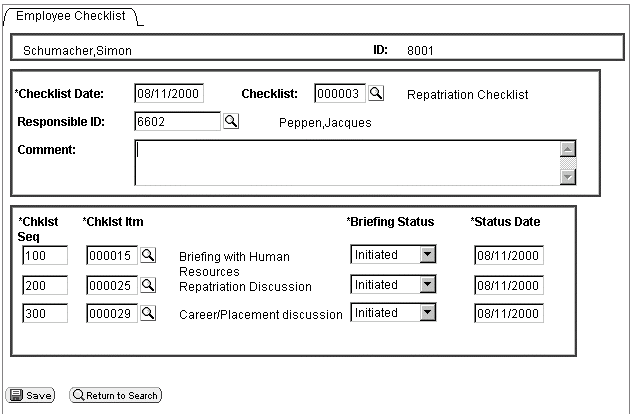
This page has the following record structure:
| Scroll Level | Associated Primary Record | Rowset and Variable Name |
|---|---|---|
|
Level zero |
PERSONAL_DATA |
Level zero rowset: &RS0 |
|
Level one scroll area |
EMPL_CHECKLIST |
Level one rowset: &RS1 |
|
Level one hidden work scroll area |
CHECKLIST_ITEM |
Level one rowset: &RS1H |
|
Level two scroll area |
EMPL_CHKLST_ITM |
Level two rowset: &RS2 |
Another way of looking at the structure of a component is to use the Structure view. All the scroll areas are labeled, and the primary record is associated with each:
The following image explains EMPLOYEE_CHECKLIST structure of a component where in all the scroll areas are labeled, and the primary record is associated with each other.
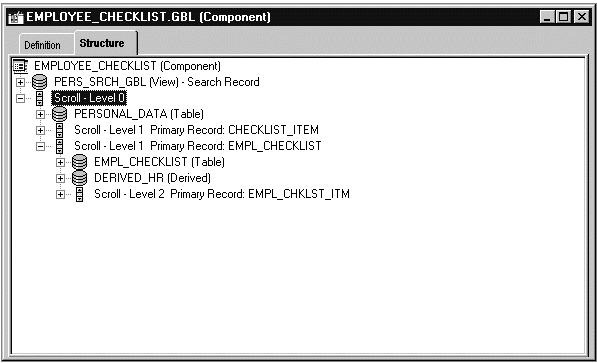
In the example, the visible level one scroll area also has only one row. That row is made up of the following records:
-
EMPL_CHECKLIST
-
DERIVED_HR
-
CHECKLIST_TBL
-
PERSONAL_DATA
You can see which records are associated with a scroll area by looking at the Order view for a page:
The following image is an example of EMPLOYEE_CHECKLIST page. This page shows the Order view of the records associated with a scroll area.
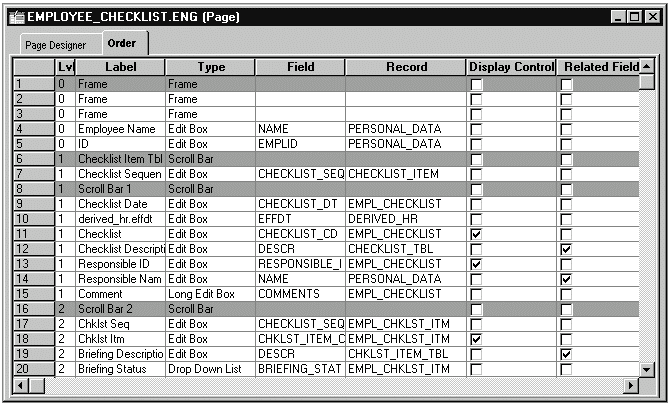
The level two rowset has three rows. Each row is made up of two records: the primary record, EMPL_CHKLST_ITM, and CHKLST_ITM_TBL, the record associated with the related display field DESCR. The following example shows the rowset:
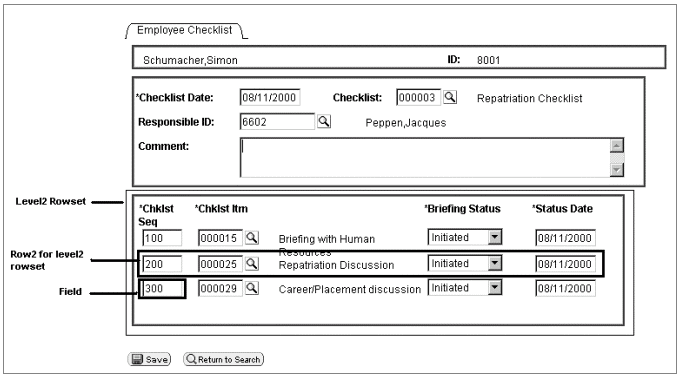
Every record has fields associated with it, such as NAME, EMPLID and CHECKLIST_SEQ. These fields are associated with the record definitions; they are not the fields that appear on the page.