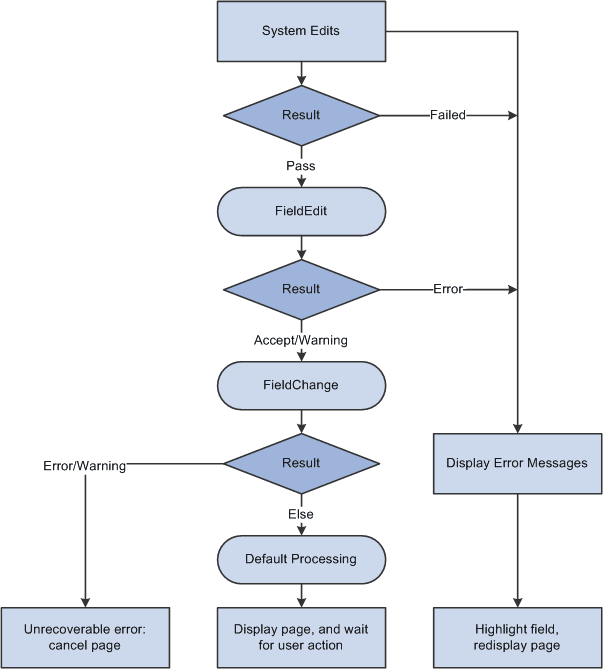
Field Change Processing
The field change processing sequence occurs after a user does any of the following:
-
Changes the contents of a field, and then leaves the field (changes focus, for example, by tabbing out of the field).
Note:
In certain, limited circumstances, tabbing out of a field is not recognized as a change of focus. This occurs when the next item in the tab order does not have an “on-focus handler.” For example, the embedded help icon does not have an on-focus handler. In these limited circumstances, field change processing will not occur.
-
Changes the state of a radio button or check box.
-
Clicks a link or a button.
In this sequence, the following actions occur:
-
The Component Processor performs standard system edits.
To reduce trips to the server, some processing must be done locally on the machine where the browser is located, while some is performed on the server.
Standard system edits can be done either in the browser, utilizing local JavaScript code, or on the application server. The following table outlines where these system edits are done.
System Edits Location of Execution Checking data type
Browser
Formatting
Application server or browser
Updating current or history record
Application server
Effective date
Application server
Effective date or sequence
Application server
New effective date in range
Application server
Duplicate key
Application server
Current level is not effective-dated but one of its child scroll areas is
Application server
Required field
Browser
Date range
Browser
Prompt table
Application server
Translate table
Browser
Yes/no table
Depends on the field type. Browser if the field is a check box. Application server if the field is an edit box and the values are Y or N.
Note:
Default processing for the field can be done in the browser only if the default value is specified as a constant in the record field properties. If the field contains a default, these defaults occur only upon component initialization. Then, if a user replaces a default value with a blank, the field is not initialized again. The required fields check is not performed on derived work fields when you press Tab to move out of a field.
If the data fails the system edits, the Component Processor displays an error message and highlights the field in the system color for errors (usually red).
-
If the field passes the system edits, Component Processor initiates the FieldEdit PeopleCode event, which triggers any FieldEdit PeopleCode associated with the record field or the component record field.
This enables you to perform additional data validation in PeopleCode. If an Error statement is called in any FieldEdit PeopleCode, the Component Processor treats the error as it does a system edit failure; a message is displayed, and the field is highlighted. If a Warning statement is executed in any FieldEdit PeopleCode, a warning message appears, alerting the user to a possible problem, but the system accepts the change to the field.
-
If the field change is accepted, the Component Processor writes the change to the component buffer, then initiates the FieldChange event, which triggers any FieldChange PeopleCode associated with the record field or the component record field.
This event enables you to add processes other than validation initiated by the changed field value, such as changes to page appearance or recalculation of values in other page fields. An Error or Warning statement in any FieldChange PeopleCode causes a runtime error.
Important:
Do not use Error or Warning statements in FieldChange PeopleCode. All data validation should be performed in FieldEdit PeopleCode.
After FieldChange processing, Component Processor runs default processing on all page fields, then redisplays the page. If the user has changed the field value to a blank, or if SetDefault or a related function is executed, and the changed field has a default value specified in the record field definition or any FieldDefault PeopleCode, the field is initialized again to the default value.
The following flowchart shows the logic of field modification processing in a Page.