Row Insert Processing
Row insert processing occurs when:
-
A user requests a row insert in a scroll area by pressing Alt+7, by clicking the Insert Row button, or by clicking the New button.
-
A PeopleCode RowInsert function or a InsertRow method requests a row insert.
In either case, the Component Processor performs these actions:
-
Inserts a new row of data into the active scroll area.
If the scroll area has a dependent scroll area, the system inserts a single new row into the blank scroll area, and the system continues until it reaches the lowest-level scroll area.
-
Initiates the RowInsert PeopleCode event, which triggers any RowInsert PeopleCode associated with the record field or the component record.
This event processes fields only on the inserted row and any dependent rows that were inserted on lower-level scroll areas.
-
Runs default processing on all component fields.
Normally this affects only the inserted row fields and fields on dependent rows, because other rows already have undergone default processing.
-
Initiates the RowInit PeopleCode event, which triggers any RowInit PeopleCode associated with the record field or the component record.
This event affects fields only on the inserted row and any dependent rows that were inserted.
-
Redisplays the page and waits for user action.
Important:
Do not use Error or Warning statements in RowInsert PeopleCode. All data validation should be performed in FieldEdit or SaveEdit PeopleCode.
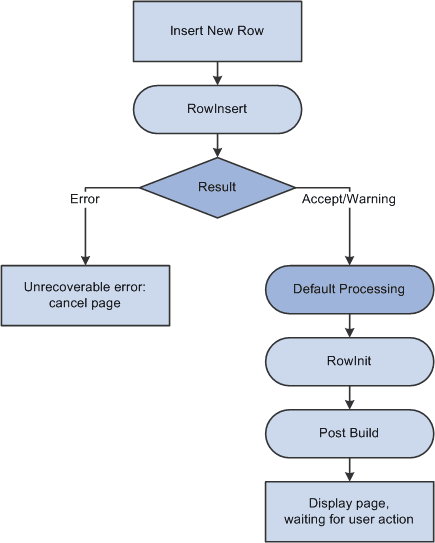
The following flowchart shows the logic of row insert processing where in a PeopleCode RowInsert function or a InsertRow method requests a row insert.
Note:
If none of the data fields in the new row are changed after the row has been inserted (either programmatically or by the user), the new row is not inserted into the database when the page is saved.