Row Delete Processing
Row delete processing occurs when:
-
A user requests a row delete in a scroll area by pressing Alt+8, by clicking the Delete Row button, or by clicking the Delete button.
-
A PeopleCode RowDelete function or a DeleteRow method requests a row delete.
In either case, these actions occur:
-
The Component Processor initiates the RowDelete PeopleCode event, which triggers RowDelete PeopleCode associated with the record field or the component record.
This event processes fields on the deleted row and any dependent child scroll areas. RowDelete PeopleCode enables you to check for conditions and control whether a user can delete the row. An Error statement displays a message and prevents the user from deleting the row. A Warning statement displays a message alerting the user about possible consequences of the deletion, but permits deletion of the row.
-
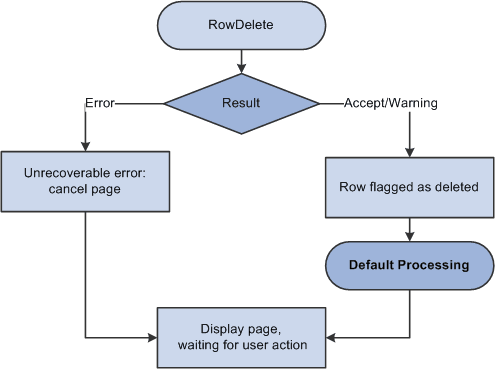
If the deletion is rejected, the page is redisplayed after the error message.
-
If the deletion is accepted, the row, and any child scroll areas dependent on the row, are flagged as deleted.
The row no longer appears in the page, but it is not physically deleted from the buffer and can be accessed by PeopleCode all the way through the SavePostChange event (note, however, that SaveEdit PeopleCode is not run on deleted rows).
-
The Component Processor runs default processing on all component fields.
-
The Component Processor redisplays the page and waits for a user action
Note:
PeopleCode programs are triggered on rows flagged as deleted in SavePreChange and SavePostChange PeopleCode. Use the IsDeleted row class property to test whether a row has been flagged as deleted. You can also access rows flagged as deleted by looping through the rows of a scroll area using a For loop delimited by the value returned by the RowCount rowset property.
The following flowchart shows the logic of row delete processing.