General Debugging Tips
The following are general tips for debugging your application:
-
If you are having problems determining if the correct data is being loaded into the component buffers, use the View Component Buffers view window to see all the values currently in the component buffer.
This is equivalent to putting a GetLevel0 function at the start of a program.
Use the &LEVEL0 variable to navigate through all the levels of the rowset object, see the row, records, fields, and so on. This shows you everything that has been loaded into the component buffers for that component.
-
While at a breakpoint, if you lose track of the window, or the location within the window, that is displaying the green execution location arrow, you can use the Execution Location Properties menu item’s ViewCode button to find your current execution location again.
-
Objects remain expanded in the variable windows as you move through PeopleCode.
This enables quick inspection of the state of an object as you step through the PeopleCode. However, there is a performance cost for using this feature. If you are finished examining an object, you may want to collapse it to improve the response speed.
-
If a database transaction has been started (either for you by PeopleTools, or by you in PeopleCode) other users of that database are blocked from accessing that database until the transaction is complete.
If you are stepping through PeopleCode while this transaction is open, you could potentially block other users for an extended period of time. You may want to use a private database for debugging to avoid blocking other users.
-
Using the debugger is resource intensive and will impact overall system performance. Oracle recommends that you do not run debugger on your production system unless the issue you are trying to debug cannot be replicated in any other environment. If that is the case, debug when there is the least activity on the system. As an alternative you can try PeopleCode tracing.
-
To create a file that contains all the PeopleCode for a project (or database), use the Find In feature and search for
;.Be sure to select Save PeopleCode to File.
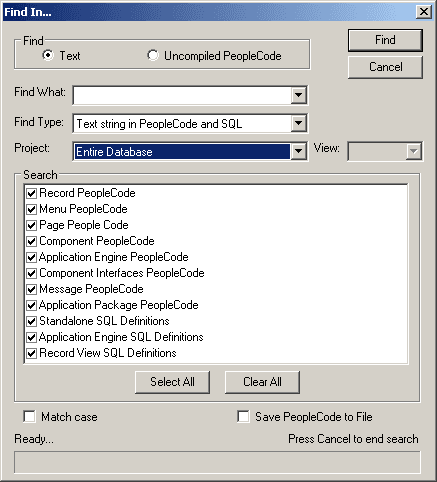
The following example shows the Find In dialog box:
This example illustrates the fields and controls on the Find In dialog box. You can find definitions for the fields and controls later on this page.
See Using the Find In Feature.
DoModal Considerations
If you set the PeopleCode debugger to break at start and you are using the DoModal PeopleCode function, the DoModal window may appear behind the PeopleCode debugger window. The debugger may appear to have stopped, but it has not. Be sure to check that other windows have not opened while you are debugging the code.