PeopleCode Built-in File Attachment Functions
All file attachments are performed using PeopleCode built-in functions, such as AddAttachment, ViewAttachment, GetAttachment, and so on. These functions operate on and transfer files to and from supported storage locations: database tables, FTP sites, HTTP, and Oracle Content and Experience Cloud (CEC) repositories.
PeopleCode provides built-in file attachment functions that are organized into three categories:
-
End user upload/download:
-
AddAttachment
Use the AddAttachment function to upload one file from an end user specified location (local storage or cloud storage) to a specified storage location.
-
MAddAttachment
Use the MAddAttachment function to upload one or more files from an end user specified location (local storage or cloud storage) to a specified storage location.
-
DetachAttachment
Use the DetachAttachment function to download a file from its source storage location and save it locally on the end user machine. The file is sent to the browser with appropriate HTTP headers to cause the browser to display a save as dialog box to the user.
See PeopleCode Language Reference: DetachAttachment function.
-
ViewAttachment
Use the ViewAttachment function to download a file from its source storage location and open it locally on the end user machine.
-
ShareAttachment
Use the ShareAttachment function to share files in Oracle Content and Experience Cloud (CEC).
See PeopleCode Language Reference: ShareAttachment function.
-
UnshareAttachment
Use the UnshareAttachment function to revoke sharing access to files in Oracle Content and Experience Cloud (CEC).
See PeopleCode Language Reference: UnshareAttachment function.
-
-
Application server upload/download:
-
PutAttachment
Use the PutAttachment function to upload a file from the file system of the application server to the specified storage location.
-
GetAttachment
Use the GetAttachment function to download a file from its source storage location to the file system of the application server.
-
-
Storage location maintenance:
-
CleanAttachments
Use the CleanAttachments function to remove orphan files (files with no corresponding file reference) from specified tables used as storage locations in the current database.
See PeopleCode Language Reference: CleanAttachments function.
-
CopyAttachments
Use the CopyAttachments function to copy all files with file references from one storage location to another. The files to be copied can be limited to those referenced in specific file reference tables.
See PeopleCode Language Reference: CopyAttachments function.
-
DeleteAttachment
Use the DeleteAttachment function to delete a file from the specified storage location.
See PeopleCode Language Reference: DeleteAttachment function.
-
The following diagram illustrates the operation of the PeopleCode file attachment functions:
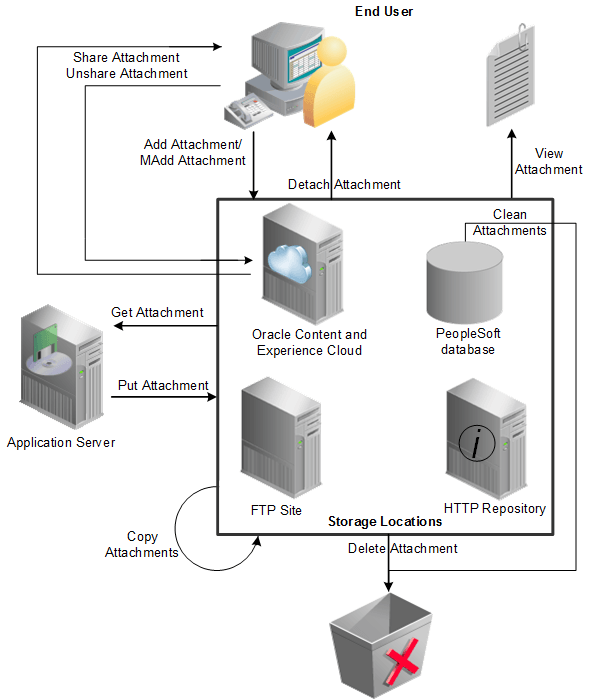
Because these functions abstract the storage of the attachments, you can use any defined storage location. The location to be used is determined by the URL passed as the first parameter to the invoked attachment function.