Understanding the File Attachment Architecture
File attachments are supported by using PeopleCode built-in functions that implement the transfer of a file to or from a storage location. Using the PeopleCode functions, files can be transferred back and forth from the end user machine to the storage location (by way of the web server and application server) or transferred back and forth from the application server file system to the storage location.
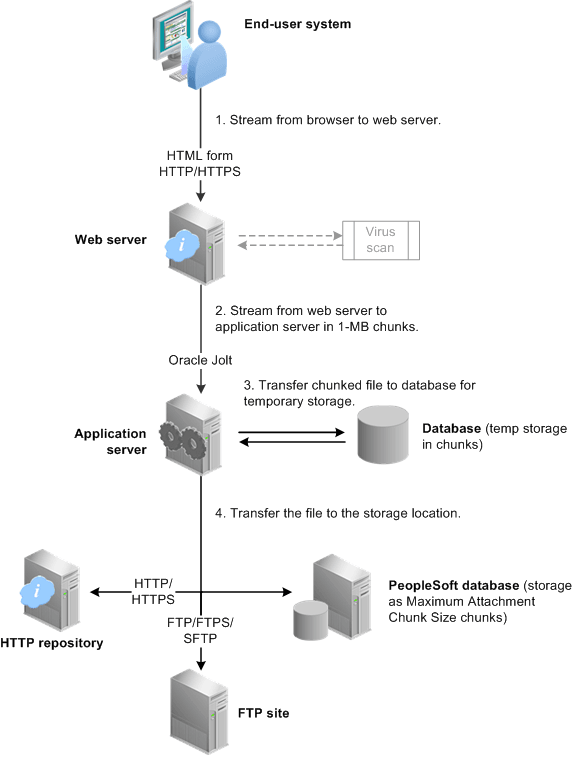
The following steps depict the process of transferring a file with the AddAttachment function:
-
The file is streamed from the browser to the servlet on the web server using a standard HTML form construct.
Optionally, if virus scan is enabled, the stream in the HTTP servlet request is scanned by the virus scan engine.
See Setting Up Virus Scanning.
Note:
This transfer can be performed securely in an encrypted fashion if the web server uses Secure Sockets Layer (SSL) to communicate to the browser.
Note:
When the user selects a file for uploading, file size is not checked until after the file is transferred to the web server. Once the file gets to the web server the file size is compared to the value of the AddAttachment function's MaxSize parameter. The transfer is terminated if the file size exceeds this parameter.
-
As the file stream is received by the web server, the file is streamed from the web server to the application server in one-megabyte chunks until there is no streamed data available on the web server.
Note:
The one-megabyte transfer chunk size between web server and application server cannot be customized.
Note:
The web server-to-application server transfer is performed by using Oracle Jolt, which is securely encrypted. Because this transfer is done using the standard Oracle Jolt mechanism, no additional settings to the firewall are required (you do not need to open additional ports).
-
The file chunks from the web server are transferred by the application server to a temporary table in the database. The chunk size for this temporary storage depends on the ultimate storage location.
For database tables, the chunk size is governed by the value of the Maximum Attachment Chunk Size field on the PeopleTools Options page. The chunk size in temporary storage can vary, but it never exceeds this maximum attachment chunk size limit. For all other storage locations, the chunk size in the temporary storage table is 16 KB.
-
Then, the application server transfers the file in chunks from the temporary database table to its ultimate storage location.
Once the entire file is transferred, the application server deletes the temporary copy from the PeopleTools table in the database.
Note:
If the storage location is a database table, then the chunk size is exactly as specified by the value of the Maximum Attachment Chunk Size field (except for the last chunk written, which can be smaller than the maximum).
See File Attachment Chunk Size.
Note:
If the storage location is an FTP site or an HTTP repository, the file is reassembled into a whole file at the destination.
Note:
The file transfer process for MAddAttachment is, in general, similar to the process for AddAttachment. With a call to MAddAttachment, the files are streamed from the browser to the web server in bulk but from the web server through to the storage location one file at a time.
The following diagram depicts this process of transferring a file with the AddAttachment function:
The file attachment architecture is designed for use in the frame template or the iframe template only. It is not supported in a pagelet or an HTML template. When content is rendered in a pagelet or HTML template, the user interaction is managed through the PeopleSoft portal servlet. For the file attachment architecture to work, the browser must communicate directly with the PeopleSoft content servlet, which requires the use of the frame or iframe template.