Row Select Processing
Row select processing enables PeopleCode to filter out rows of data after they have been retrieved from the database server and before they are copied to the component buffers. Row select processing uses a SQL Select statement .
Row select processing is a subprocess of component build processing in add modes. It also occurs after a ScrollSelect or related function is executed.
See Component Build Processing in Add Modes.
Note:
Instead of using row select processing, it is more efficient to filter out the rows using a search view, an effective-dated record, the Select method, or ScrollSelect or a related function, before the rows are sent to the browser.
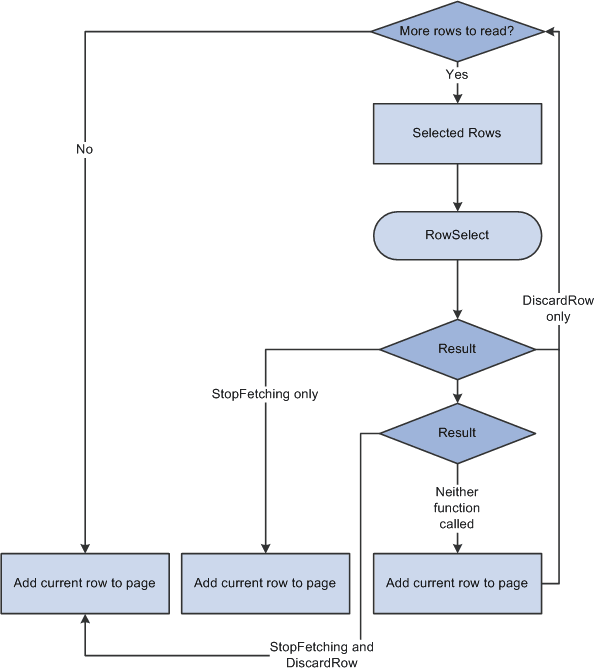
In row select processing, the following actions occur:
-
The Component Processor checks for more rows to add to the component.
-
The Component Processor initiates the RowSelect event, which triggers any RowSelect PeopleCode associated with the record field or component record.
This enables PeopleCode to filter rows using the StopFetching and DiscardRow functions. StopFetching causes the system to add the current row to the component, and then to stop adding rows to the component. DiscardRow filters out a current row, and then continues the row select process.
-
If neither the StopFetching nor DiscardRow function is called, the Component Processor adds the rows to the page and checks for the next row.
The process continues until there are no more rows to add to the component buffers. If both StopFetching and DiscardRow are called, the current row is not added to the page, and no more rows are added to the page.
Note:
In RowSelect PeopleCode, you can refer only to record fields on the record that is currently being processed, because the buffers are in the process of being populated. This means that the data might not be present.
The following flowchart shows the logic of RowSelect processing in a Page.
Related Topics