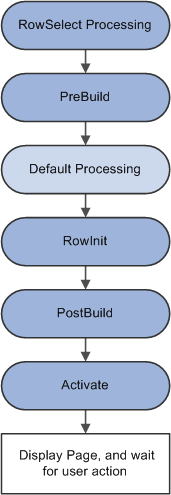
Component Build Processing in Update Modes
After the Component Processor has saved the search keys values for the component, it uses the search key values to select rows of data from the database server using a SQL Select statement. After the rows are retrieved, the Component Processor performs these actions:
-
Performs row select processing, in which rows of data that have already been selected from the database server can be filtered before they are added to the component buffer.
-
Initiates the PreBuild event, which triggers any PreBuild PeopleCode associated with the component record, enabling you to set global or component scope variables that can be used later by PeopleCode located in other events.
The PreBuild event is also used to validate data entered in the search page, after a prompt list is displayed.
Note:
If a PreBuild PeopleCode program issues an error or warning, the user is returned to the search page. If there is no search page, that is, the search record has no keys, a blank component page appears.
-
Performs default processing on all the rows and fields in the component.
-
Initiates the RowInit event, which triggers any RowInit PeopleCode associated with the record field or the component record.
The RowInit event enables you to programmatically initialize the values of non-blank fields in the component.
-
Initiates the PostBuild event, which triggers any PostBuild PeopleCode associated with the component record, enabling you to set global or component scope variables that can be used later by PeopleCode located in other events.
-
Initiates the Activate event, which triggers any Activate PeopleCode associated with the page about to be displayed, enabling you to programmatically control the display of that page.
-
Displays the component and waits for end-user action.
The following flowchart shows the logic of Component build processing in update modes.