Search Processing in Add Modes
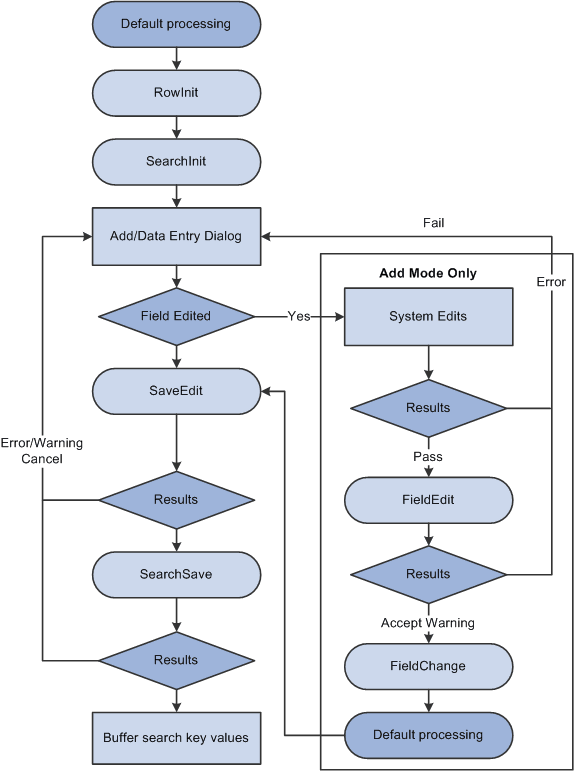
When a user opens a component in add or data-entry modes, the following actions occur:
-
The Component Processor runs default processing on the high-level keys that appear in the Add or Data Entry dialog box.
-
The Component Processor initiates the RowInit event, which triggers any RowInit PeopleCode associated with the record field or the component record, on the Add or Data Entry dialog box fields.
-
The Component Processor initiates the SearchInit event on dialog fields, which triggers any SearchInit PeopleCode associated with the record field or the component search record.
This enables you to execute PeopleCode programs before the dialog box appears.
-
The Component Processor displays the Add or Data Entry dialog box.
-
If the user changes a dialog box field, and then leaves the field or clicks OK, the following actions occur:
-
In add mode only, a field modification processing sequence occurs.
-
Default processing is run on the Add or Data Entry dialog box fields.
Normally this does not have any effect, because the fields have a value.
-
-
When the user clicks OK in the dialog box, the SaveEdit event is initiated, which triggers any PeopleCode associated with the record field or the component record.
-
The Component Processor initiates the SearchSave event, which triggers any SearchSave PeopleCode associated with the record field or the component search record.
This enables you to validate user entry in the dialog box. If an error is executed in SearchSave, the user is sent back to the Add or Data Entry dialog box. If a warning is executed, the user can click OK to continue or click Cancel to return to the dialog box and enter new values.
-
The Component Processor buffers the search key values and continues processing.
Note:
If you compare the following diagram with search processing in update modes, notice that the add modes are considerably more complex and involve more PeopleCode events. However, in practice, PeopleCode development is similar in both cases. PeopleCode that runs before the dialog box appears (for example, to control dialog box appearance or set values in the dialog box fields) generally is placed in the SearchInit event; PeopleCode that validates user entry in the dialog box is placed in the SearchSave event.
The following flowchart diagram shows the logic of Search processing in add and data-entry modes.
Note:
You can use the IsSearchDialog function to create PeopleCode that runs only during search processing. To create processes that run only in a specific action mode, use the %Mode system variable. This could be useful in code that is part of a library function and that is invoked in places other than from the search page. It could also be used in PeopleCode associated with a record field that appears in pages and in the search page.