RowInsert Event
When a user adds a row of data, the Component Processor generates a RowInsert event. You should use RowInsert PeopleCode for processing specific to the insertion of new rows. Do not put PeopleCode in RowInsert that already exists in RowInit, because a RowInit event always initiates after the RowInsert event, which will cause your code to be run twice.
Note:
Generally, if none of the fields in the new row are changed after the row has been inserted (either by a user pressing Alt+7 or programmatically), when the page is saved, the new row is not inserted into the database. However, if the ChangeOnInit rowset class property is set to False, you can set values for fields in a new row in RowInsert or RowInit PeopleCode, and the row won't be saved.
The RowInsert event triggers PeopleCode on any field on the inserted row of data.
Do not use a warning or error in RowInsert.
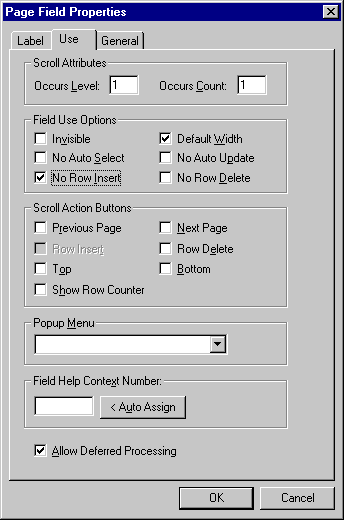
You can prevent a user from inserting rows into a scroll area by selecting the No Row Insert check box in the page field properties, as shown in the following illustration. However, you cannot prevent row insertion conditionally.
This example illustrates the fields and controls on the Setting row insert properties in page field properties for a scroll bar. You can find definitions for the fields and controls later on this page.
Note:
RowInsert does not trigger PeopleCode on derived/work fields.
RowInsert PeopleCode can be associated with record fields and component records.