Example of Method B: Viewing Trees With Multi-Node Selection
An example of an application that uses the PSTREEVIEWER secondary page with the Multinodeselection flag set to "Y" is the Query Manager component.
To view the Tree Viewer secondary page from Query Manager:
-
Select
-
Click the Edit link for any query.
-
Click the Add Criteria icon button.
-
Select Field as the first expression.
-
Select in tree as the condition type.
-
Click the New Node List link.
-
Select a tree to display.
-
Use the page fields and tree widgets to select multiple tree nodes.
-
Once all tree nodes have been selected, click the OK button.
The following example shows the QE_PERS_DATA tree as viewed on the Tree Viewer secondary page with multi-node selection:
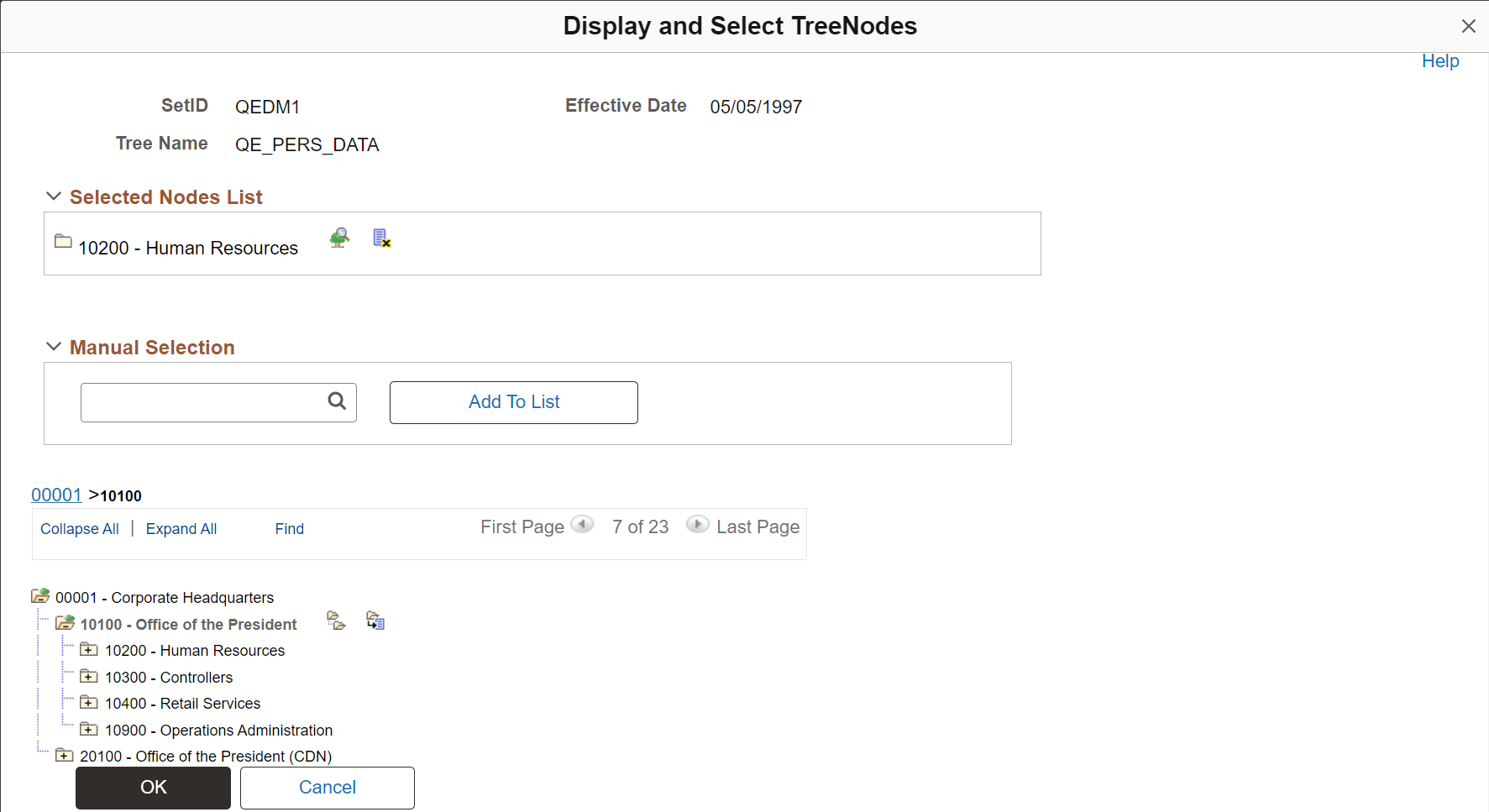
The Tree Viewer secondary page (PSTREEVIEWER) in Method B has a frame that holds the Selected Nodes List with action buttons associated with each selected node. This page is used to select the set of nodes, return them to the calling application (Query Manager), and use the list of nodes as Query criteria.
Once all nodes have been selected, the selected tree setID, tree name, effective date, and selected nodes display in the Select Tree Node List group box. The list of selected nodes can also be read from the Multinode field of the PSTREEVIEWWRK work record as a comma-separated string. The string can be parsed to get the node names.