Reviewing the OpenSearch, OpenSearch Dashboards, and Logstash Deployment
Here is an overview of the deployment process.
Figure 1-1 Deployment of OpenSearch, OpenSearch Dashboards, and Logstash
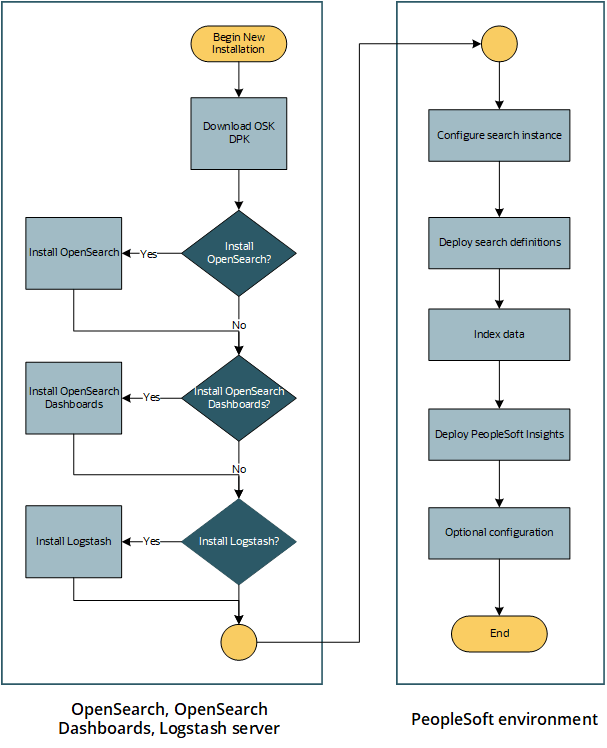
The deployment of OpenSearch for PeopleSoft environments includes the following high-level steps:
-
Download the Linux or Microsoft Windows version of the OSK DPK from My Oracle Support or Oracle Software Delivery Cloud.
See "Deploying the OpenSearch, OpenSearch Dashboards, and Logstash Deployment Package," Obtaining the OpenSearch, OpenSearch Dashboards, and Logstash DPK.
-
Extract the DPK zip file and run the script to deploy and set up OpenSearch, OpenSearch Dashboards, and Logstash.
See "Deploying the OpenSearch, OpenSearch Dashboards, and Logstash Deployment Package."
-
Set up the OpenSearch instance in the PeopleSoft application.
See "Integrating OpenSearch with the PeopleSoft Environment."