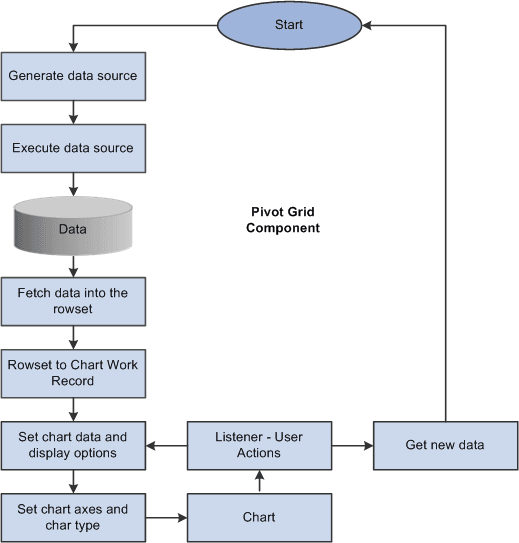
Chart-Display Component
The Pivot Grid Chart-display component also uses the Pivot Grid Data Source Engine component to retrieve data from the source. It provides the following functionality:
-
Invokes the Pivot Grid Data Source Engine interfaces to modify the data source at runtime to retrieve data.
If the display option is Chart Only, a single data source modification and run suffices for retrieving the relevant charting data; extra modifications are required to get filter values. If the display option is Pivot Grid and Chart, Pivot Grid uses the result set that was retrieved when populating the grid for chart display.
-
Calls the appropriate PeopleCode charting APIs for generating and rendering the chart control on the page.
-
If the display option is Chart Only, users can drill down on the chart by clicking the data points of the chart to display details.
After drilling down, a drill-out option is available as a locator link at the top of the chart. Clicking the drill-out link restores the chart to its earlier state.
Note:
The number of drill downs that can be performed on a chart-only view has no limitations. If you perform the fifth drill down, Pivot Grid resets the drill-down links and restarts from the first position.
-
All the pivoting, drilling down, and filtering operations on the grid result in an appropriate synchronization action on the chart if the display option is Pivot Grid and Chart.
This diagram shows the processes of the Pivot Grid Chart-display component.