Create Analytics-Step 1
Use the Create Analytics Wizard - step 1 (PTPG_REPORT_WIZ_1) to specify the names of the analytic reports, select the analytic report template and select the display options that will be used to create the analytic report.
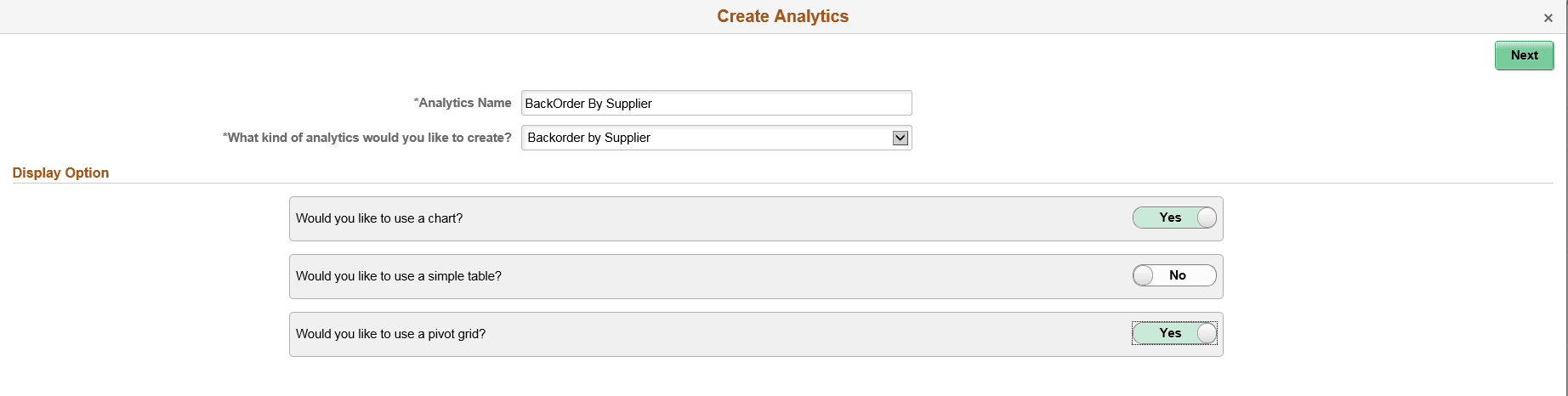
This example illustrates the fields and controls on the Create Analytics Wizard - step 1. Definitions for the fields and controls appear following the example.
| Field or Control | Description |
|---|---|
|
Analytics Name |
Enter a name for the analytic report. |
|
What kind of analytics would you like to create? |
Displays the available analytic templates that are used to create the analytic report. The template you select from this list determines the fields and prompts in the next step of the wizard, Create Analytics - step 2. Note: This drop-down list is not available when only one template is available. |
|
Display Option |
Define the display options for the analytic reports. The available options and combinations are:
|
|
Next |
Click to advance the wizard to the next page. |