General Options
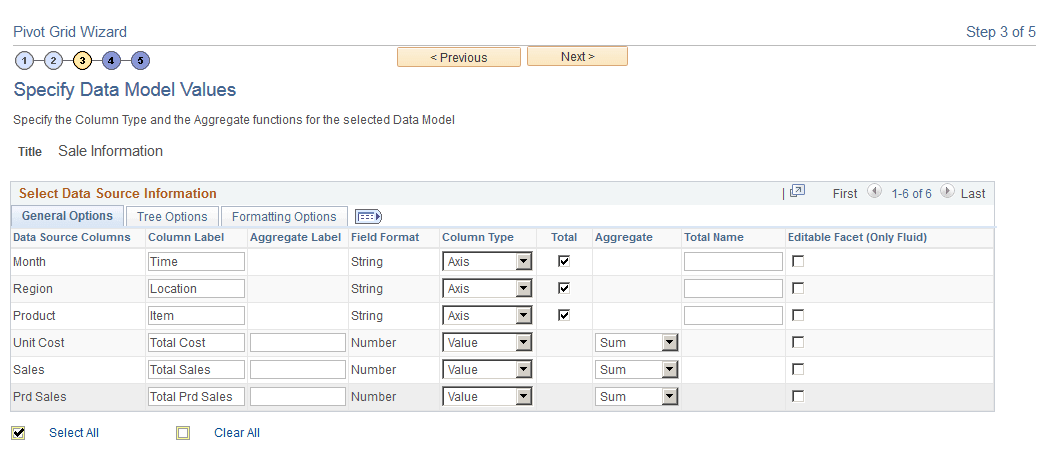
This example illustrates the fields and controls on the Specify Data Model Values page. Definitions for the fields and controls appear following the example.
| Field or Control | Description |
|---|---|
|
Column Label |
(Optional) Specify the labels for columns (dimensions/facts). The labels apply to grids and charts. Note: Column labels must be unique. No two data source columns can have the same label. |
|
Aggregate Label |
(Optional) Enter the aggregate labels for the columns. These aggregate labels will be:
For example, the label of the Unit Cost column is set to Total Cost, the label of the Sales column is set to Total Sales, and the label of the Prd Sales column is set to Total Prd Sales.
The behavior of the Aggregate Label field is applied to both classic and fluid views. |
|
Column Type |
Define the axis, value, or display members for a column. Select the Display option to enable the column to appear in the detailed-data view of the grid and the chart. Note: At least one Axis and one Value member are required. You can also select this column as a related action parameter for a Pivot Grid model in the detailed-data view. If the PSQuery formula is based on an expression and that expression is used in the Pivot Grid model, then:
|
|
Total |
Select which Axis members have the Total (All) attribute enabled. Note: This column is available only for the data source column with column type Axis. |
|
Aggregate |
Define the aggregate functions for the Value type members. Available options are Average, Count, Count Distinct, Maximum, Minimum, Sum, and None. Note: This column is only available for the data source column with column type Value. Value members of type Number and Signed Number can be associated with any of the aggregate functions. Value members of any other type can only be associated with the Count aggregate function. Count or Count Distinct aggregates are available for the fact fields that are set to character. If the PSQuery expression is based on a formula and that expression is used in the Pivot Grid model, then the type of the column should be set to Value, and the Aggregate value should be set to None to avoid multiple aggregations on the column. |
|
Total Name |
(Optional) Specify the total names, which override the default All string. |
|
Editable Facet |
Select to enable the data source columns as editable facets (prompts) in fluid view. |
|
Next |
Click this button to advance the wizard to the next page. |