Pivot Grid Pagelet Overview
PeopleSoft Pivot Grid functionality is currently used by Pagelet Wizard. Pagelet Wizard uses the Pivot Grid Viewer component and publishes the pivot grid as a pagelet. During pagelet creation using the Pagelet Wizard, the system stores all the parameters that were required for the Pivot Grid Viewer component: Pivot Grid Name and Pivot Grid View Name. When the pagelet is invoked, these parameters are passed to the component, which parses them and renders the display.
Note:
If the query used in the Pivot Grid model is changed after the Pivot Grid pagelet is created, you need to modify and save the Pivot Grid model to ensure that Pivot Grid Viewer and Pivot Grid pagelet display all changes properly.
Pagelet Creation
This diagram shows the pagelet creation process flow.
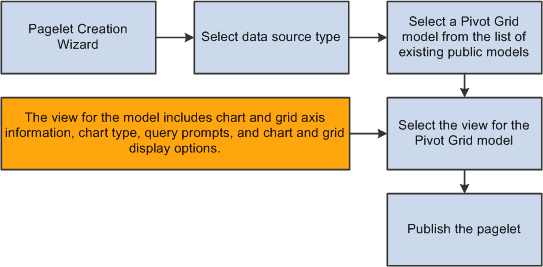
In the Pagelet Wizard, you are able to:
-
Select the data source type of Pivot Grid.
-
Select the Pivot Grid model to use.
-
Select the Pivot Grid view.
-
Publish the pagelet.
Pagelet Viewing
This diagram shows the flow for viewing a Pivot Grid pagelet.
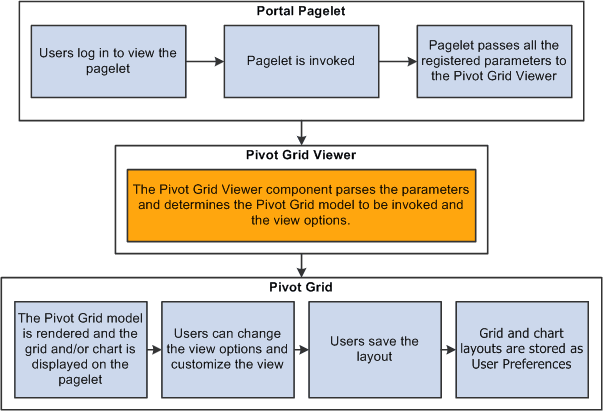
When you open a pagelet that contains a pivot grid, all of the registered parameters are passed to the Pivot Grid Viewer. From the pagelet, you can perform all of the tasks that can be performed directly from the Pivot Grid Viewer.