Pivot Grid as a Subscriber
Pivot Grid subscribes to Inter Window Communication (IWC) publications from transaction pages and other pivot grids and charts. The subscription can only happen on the filters and prompts, and then pivot grids are refreshed with the subscribed values. When subscribing to publications from another pivot grid or chart filter, the subscription supports the multi-select option in filters. When subscribing from a transaction page, the values in publication should be separated by semicolons (;) to support multiselect filter values.
The IWC configuration for subscriptions contains the following values:
-
Event Name: Enter the named configuration for this subscription.
This name matches the publication configuration event name that runs the publication.
-
Message Event Type: Sub.
-
Field Event Type: Change.
-
HTML Field Name: PVGSUB.
-
Message data: Enter the prompts and filters in the following format:
-
Filter: SUB_FLR-<Query field name>
-
Prompt: SUB_PRMT-<Unique query prompt name> (available in query definition)
-
This example illustrates the Content Reference Message Events page with IWC configuration for subscriptions.
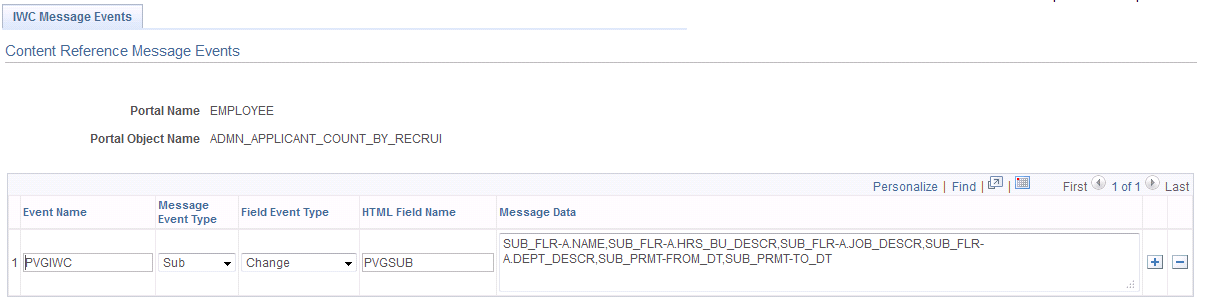
If a subscription is in multiple prompts and filters, the message data separates prompts and filters using commas. A corresponding publication configuration exists with a list of corresponding publication fields that are separated by commas. The publication is from transaction pages or from other pivot grids and charts.