Specifying Pagelet Information
Use the Specify Pagelet Information page (PTPPB_WIZ_INFO) to enter the pagelet title and other pagelet information.
Navigation:
Access the Specify Pagelet Information page by selecting
This example illustrates the fields and controls on the Specify Pagelet Information page. Definitions for the fields and controls appear following the example.
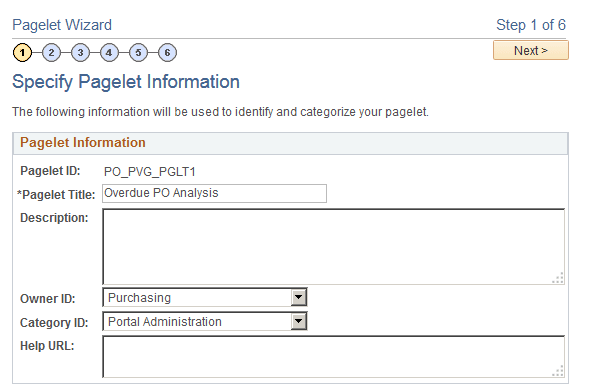
| Field or Control | Description |
|---|---|
|
Pagelet Title |
Enter a title for the Pivot Grid pagelet. This field is required. |
|
Category ID |
Select the pagelet category ID. Note: The portal administrator can use this value when running pagelet reports and when searching for pagelets that need to be moved between different portal sites. |
|
Next |
The Next button is available after you enter the pagelet title in the Pagelet Title field and move the cursor to any other field. Click this button to advance the wizard to the next page. |