Administering Activity Guide Instances
Use the Manage Activity Guide Instances page to manage activity guide instances.
Navigation:
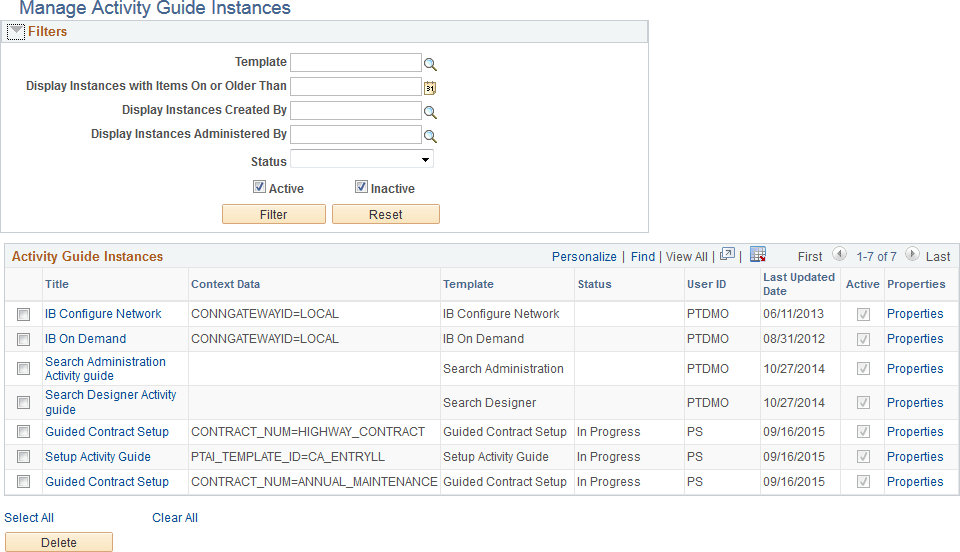
This example illustrates the fields and controls on the Manage Activity Guide Instances page. You can find definitions for the fields and controls later on this page.
Filters
| Field or Control | Description |
|---|---|
|
Template |
Select an activity guide template as a filter criteria. |
|
Display Instances with Items On or Older Than |
Select a date to filter by. |
|
Display Instances Created By |
Select a user ID as a filter criteria. |
|
Display Instances Administered By |
Select a user ID as filter criteria. |
|
Status |
Select a status as a filter criteria. |
|
Active |
Select whether to include active instances. |
|
Inactive |
Select whether to include inactive instances. |
|
Filter |
Click to filter the list by the selected criteria. |
|
Reset |
Click to clear all filter criteria. |
Activity Guide Instances
| Field or Control | Description |
|---|---|
|
Title |
Click a title link to manage the action items for that instance. |
|
Properties |
Click the Properties link to manage the properties for that instance. |
|
Select All |
Click to select all instances. |
|
Clear All |
Click to clear the selection of any instances. |
|
Delete |
Click to delete the selected instances. |