Administering WorkCenter Pages
Access the Manage WorkCenter Pages page. (Select .)
| Field or Control | Description |
|---|---|
|
Create New WorkCenter Page |
Click to access the Select the WorkCenter Starting Page page and begin the process of creating a WorkCenter page. |
This example illustrates the fields and controls on the Manage WorkCenter Pages page. You can find definitions for the fields and controls later on this page.
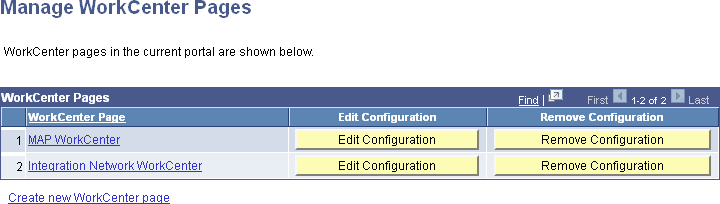
| Field or Control | Description |
|---|---|
|
WorkCenter Page |
Displays the content reference name as an active link. Click to access the content reference and view the WorkCenter. |
|
Edit Configuration |
Click to access the Configure WorkCenter Page page. |
|
Remove Configuration |
Click to delete the WorkCenter page, all pagelet groups, and all pagelet configurations associated with the content reference. Note: Removing WorkCenter page configurations neither deletes the content reference upon which it is based nor does it delete the pagelets. |
|
Create New WorkCenter Page |
Click to access the Create WorkCenter Page page to begin the process of creating a WorkCenter by selecting a WorkCenter starting page. |