Configuring an Alternate Content Reference Using the CN_DISPLAYMODE Attribute
The CN_DISPLAYMODE_N attribute is used to navigate from a classic content reference to a fluid content reference and vice versa. Configuring this attribute ensures that when you access a content reference configured for display mode the appropriate content reference (classic or fluid) is automatically displayed based on the factors.
Note:
When you use the CN_DISPLAYMODE_N attribute, ensure that you configure bidirectional alternate content references. That is, a fluid content reference must be configured to point to a classic content reference and a classic content reference must be configured to point to a fluid content reference.
When you want to specify multiple conditions for a content reference, you can sequence the conditions by replacing N with a number.
The following table shows the attribute name and attribute-value syntax:
| Attribute Name | Attribute Value |
|---|---|
|
CN_DISPLAYMODE_N |
KEY1=CREF |
Use the Content Ref Administration page ( and click the Edit link of a content reference) to configure an alternate content reference by adding the required attributes in the Content Reference Attributes section.
This example illustrates the fields and controls on the Content Ref Administration - Content Reference Attributes section. You can find definitions for the fields and controls later on this page.
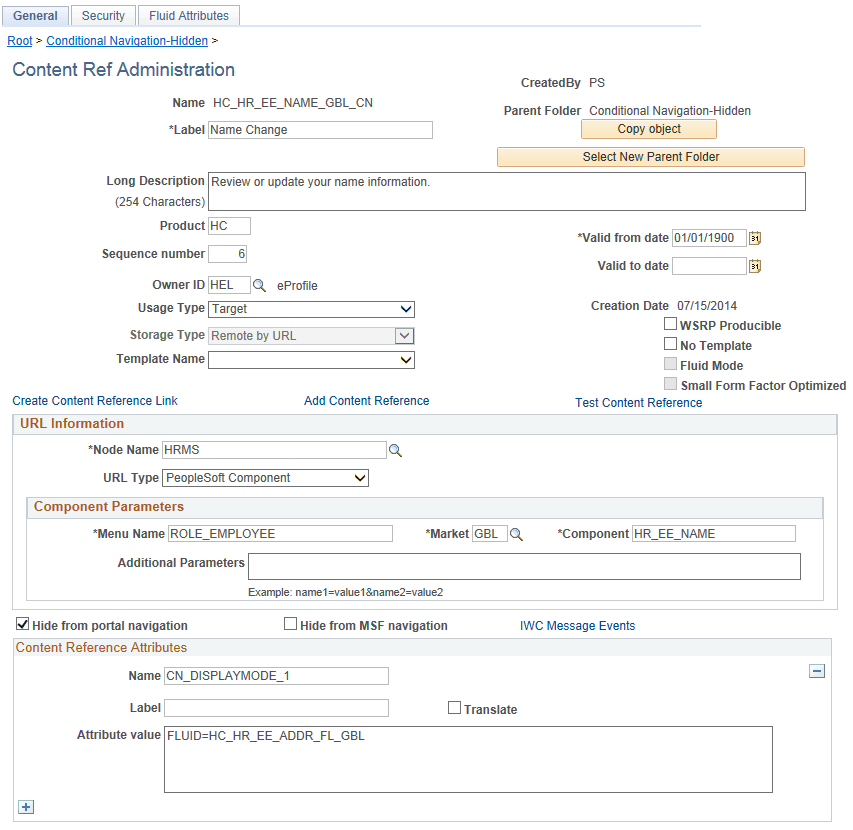
This table describes the fields that are associated with conditional navigation. For information on all the fields on the Content Ref Administration page, see Defining Content References.
| Field or Control | Description |
|---|---|
|
Additional Parameters |
Important: If any additional parameters are defined, all of the additional parameters and only these additional parameters must be included in the request URL. |
|
Name |
Enter an attribute, for example, CN_DISPLAYMODE_1. |
|
Translate |
Do not select the Translate check box. Conditional navigation does not support the Translate check box. |
|
Attribute value |
Enter the alternate content reference. For example, FLUID=HC_HR_EE_ADDR_FL_GBL. |