Configuring Cookie Rules
Access the Web Profile Configuration page. (Select Select the Cookie Rules tab.)
This example illustrates the fields and controls on the Web Profile Configuration - Cookie Rules page. You can find definitions for the fields and controls later on this page.
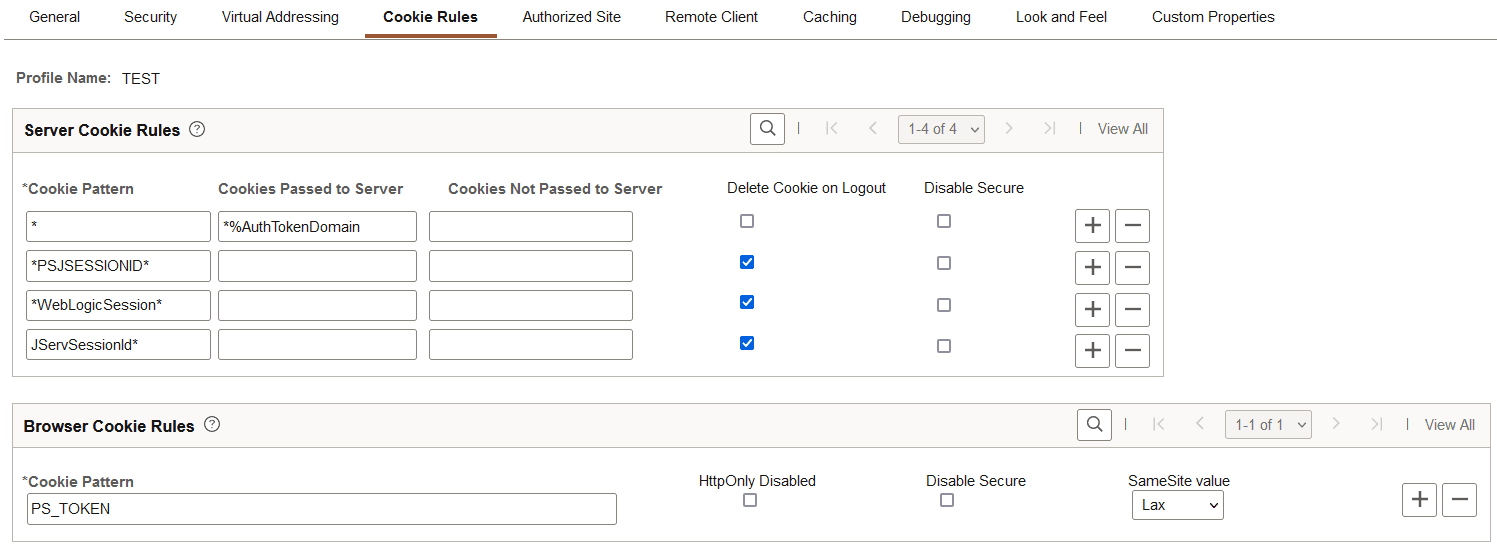
This page defines rules that determine how the portal passes cookies to other servers and browsers. Use the respective grids to define which cookies are passed, and how. Both server and browser cookie names are case sensitive.
Oracle WebLogic web servers use browser cookies (containing the server path and domain) to establish session identity. These cookies have a default name that's used to retrieve the cookie on each request to the web server. In an environment in which multiple web servers are in use with the portal, you need to define unique session cookie names between web servers to prevent one cookie from overwriting another cookie of the same name set by a different web server. The path or domain of the cookie must be different to prevent overwriting.
Server Cookie Rules
Note:
Use the first three fields to specify patterns to match, where the asterisk ( * ) is treated as a wildcard, matching zero or more characters.
The portal knows its own domain (from the authentication domain), and the first default rule instructs it to pass portal servlet cookies to any server in the same domain, over both secure and insecure connections. All other cookies can continue to be passed to any server on any domain.
| Field or Control | Description |
|---|---|
|
Cookie Pattern |
Specify the name pattern for cookies to which this rule applies. For example, to specify all cookies whose names start with HR_, enter the value HR_*. |
|
Cookies Passed to Server |
Specify the name pattern for the servers to which the specified cookies should be passed. For example, to specify all servers in the domain .hr.example.com, enter the value *.hr.example.com. You can use a substitution parameter %AuthTokenDomain to represent the authentication domain currently in effect. |
|
Cookies Not Passed to Server |
Specify the name pattern for the servers to which the specified cookies should not be passed. You can use a substitution parameter %AuthTokenDomain to represent the authentication domain currently in effect. Note: This field takes precedence over the Cookies Passed to Server field. |
|
Delete Cookie on Logout |
Select to indicate that the cookie should be deleted when the user signs out of the portal. Note: This check box is deselected for the first default rule (matching all cookies), but any cookies that are generated by PeopleSoft with, for example, the PSJSESSIONID prefix, are deleted when the user signs out. If you're running multiple PeopleSoft portals and want cookies to be maintained after the user signs out, update this page to specify which cookies to preserve or delete. Warning! Oracle recommends that you use extreme caution when setting all cookies to be deleted on sign-out. Cookie pattern "*" means all cookies. Some cookies must be kept. For example, the Arrow Point cookie (ARPT) is used by some load balancers to ensure sticky http(s) sessions. |
|
Disable Secure |
Cookies are sent secure by default over secure (HTTPS) connections. Select this setting to disable the secure attribute for this cookie, which allows it to be sent in requests over insecure (HTTP) connections. This setting applies only when HTTPS is being used. |
Browser Cookie Rules
Use the Browser Cookie Rules grid to define exceptions to the default settings for browser cookies.
Unless an exception rule is defined in this Browser Cookie Rules grid, PeopleSoft cookies are delivered as HTTP-only by default. For browsers that support this option, this prevents client side scripts such as JavaScript from accessing a PeopleSoft cookie. Also, unless an exception rule is defined in this Browser Cookie Rules grid, PeopleSoft cookies are delivered as Secure by default in HTTPS mode This setting applies only when HTTPS is being used. The secure attribute is always disabled for all cookies when HTTP is being used. FInally, unless an exception rule is defined in this Browser Cookie Rules grid, PeopleSoft cookies are delivered with a SameSite value of Strict.
Note:
The following cookies cannot be controlled using the web profile configuration: PS_TOKENEXPIRE, PS_DEVICEFEATURES, PS_LOGINLIST, http*refresh, IOS_FULLSCREEN, ps_theme, and psback.
| Field or Control | Description |
|---|---|
|
Cookie Pattern |
Specify the name pattern for cookies to which this rule applies. For example, to specify all cookies whose names start with HR_, enter the value HR_*. For browser cookies only, if a cookie is identified with both an absolute name and name via a wildcard, the cookie rule using an absolute name is given precedence. For example, a rule for PS_LASTSITE is given precedence over a rule for PS_*SITE. |
|
HttpOnly Disabled |
Select to indicate that the cookie can be accessed by JavaScript from the browser side. |
|
Disable Secure |
Cookies are sent secure by default over secure (HTTPS) connections. Select this setting to disable the secure attribute for this cookie, which allows it to be sent in requests over insecure (HTTP) connections. This setting applies only when HTTPS is being used. |
|
SameSite value |
Select the SameSite value
|