Configuring Event Mapping
Use the Event Mapping Configuration page to map application class PeopleCode to component level, page level, component record level, and component record field level events.
Navigation:
On the Event Mapping Configuration search page:
-
Click the Add Configuration button to search for a content reference and then add a new event mapping configuration.
-
Click an Edit Configuration button to modify an existing event mapping configuration.
Searching for a Content Reference
Note:
Event mapping is restricted to content references for registered components only. Therefore, search results are filtered to include registered components only.
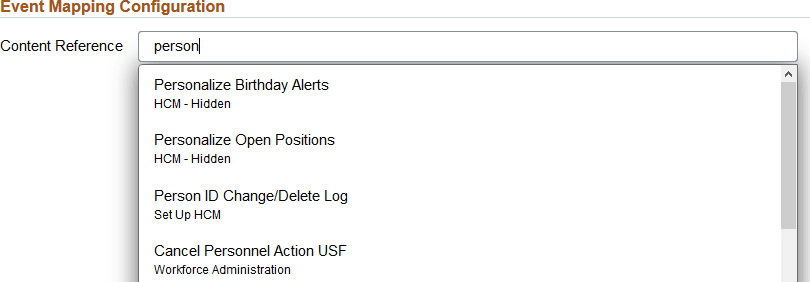
After clicking the Add Configuration button, enter a search term or phrase. The search results are updated as you type. Select a content reference from the search results to add a new event mapping configuration.
Completing the Configuration
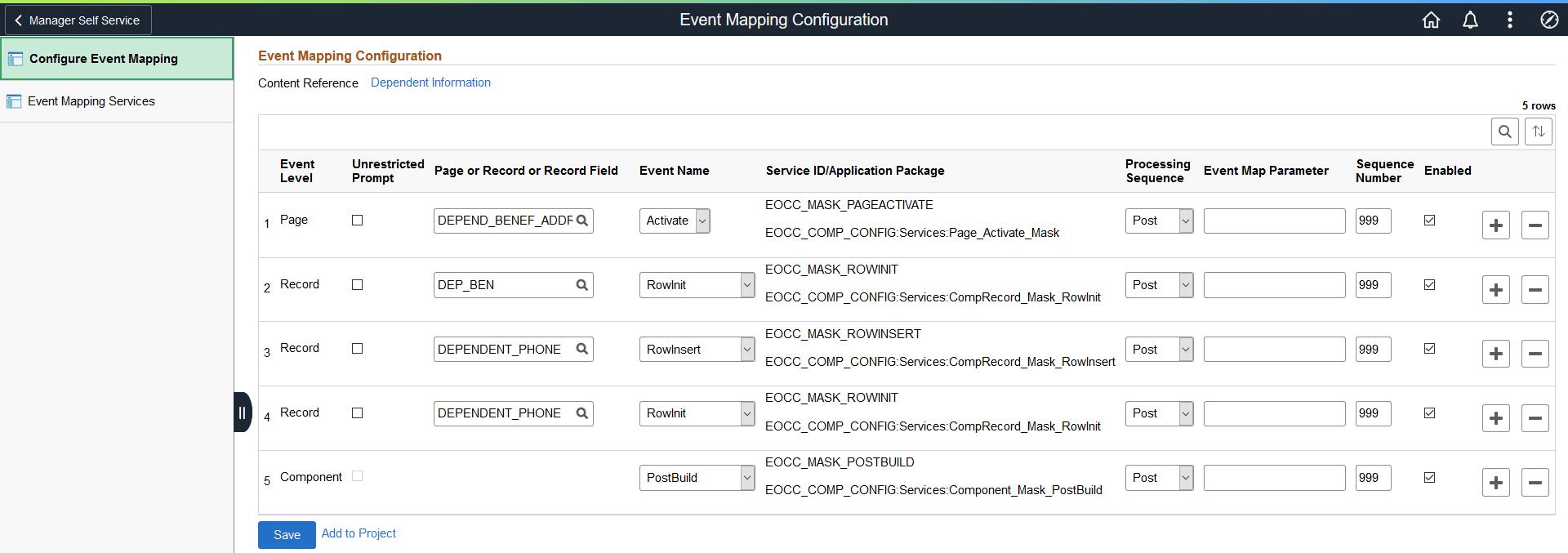
This example illustrates the fields and controls on the Event Mapping Configuration page. You can find definitions for the fields and controls later on this page.
| Field or Control | Description |
|---|---|
|
Event Level |
Select an option to specify the event level:
|
|
Unrestricted Prompt |
Select the unrestricted prompt only when the item for which you are searching is not found on a page definition that is explicitly included in the component definition. This allows an unrestricted search of all matching definitions within the system. Use the unrestricted prompt only when:
Note: If you return to this configuration, the unrestricted prompt check box is no longer selected. However, the actual configurations are retained. This allows you select the unrestricted prompt again if you need to reconfigure these items in an unrestricted manner. |
|
Page or Record or Record Field |
Select the page name, record name, or combination of record name and field name corresponding to the event level selected previously. If Component is selected as the event level, this field is not displayed and no selection is required. |
|
Event Name |
|
|
Service ID/Application Package |
Select an application class-based related content service definition. Note: The list of application class-based services is filtered to include only those that have implemented the PT_RCF:ServiceInterface base class. |
|
Processing Sequence |
Select the processing sequence with respect to any PeopleCode program defined for the same event on the component definition:
|
|
Event Map Parameter |
Optionally, specify a string value to selectively invoke a specific block of code within the application class. This allows you to use a single application class in multiple configurations separating each bit of functionality into separate blocks. This application class must implement the eve_execute method in addition to an empty execute method. Within the eve_execute body, conditional logic must evaluate the event map parameter and execute the appropriate block of code for each valid parameter value. See the following PeopleCode example. |
|
Sequence Number |
Specify a processing sequence when more than one custom application class program is mapped to the same event. |
|
Enable |
Deselect this check box to disable execution of the application class, but retain the event mapping configuration. |
|
Save |
Click the Save button to save the configuration. |
|
Add to Project |
Click the Add to Project link to access the Add To Project page to insert this event mapping configuration into an ADS project. See Lifecycle Management Guide: Adding Data Set Instances from Object Designer Pages for more information. |
PeopleCode Example for Multiple Events in a Single Application Class
The following application class presents an example of how eve_execute could be implemented:
import PT_RCF:ServiceInterface;

class App_Class1 implements PT_RCF:ServiceInterface
   method execute();
   method eve_execute(&str As string);
end-class;

method execute
   /+ Extends/implements PT_RCF:ServiceInterface.execute +/
end-method;

method eve_execute
   /+ &str as String +/
   /+ Extends/implements PT_RCF:ServiceInterface.eve_execute +/
   /* &str variable will have the Event Map Parameter that was */
   /* set in the configuration page for that particular event  */
   /* that is being triggered.                                 */
   Evaluate &str
   When = "1"
      /* Code block for PreBuild event */
   When = "2"
      /* Code block for PostBuild event */
   When-Other
      /* Code block to handle an invalid event map parameter  */
   End-Evaluate;
end-method;