Managing PeopleCode Event Mapping
Use the Event Mapping Configuration search page to manage which content references have associated PeopleCode application package programs.
Note:
Event mapping is restricted to content references for registered components only.
Navigation:
.
This example illustrates the fields and controls on the Event Mapping Configuration search page. You can find definitions for the fields and controls later on this page.
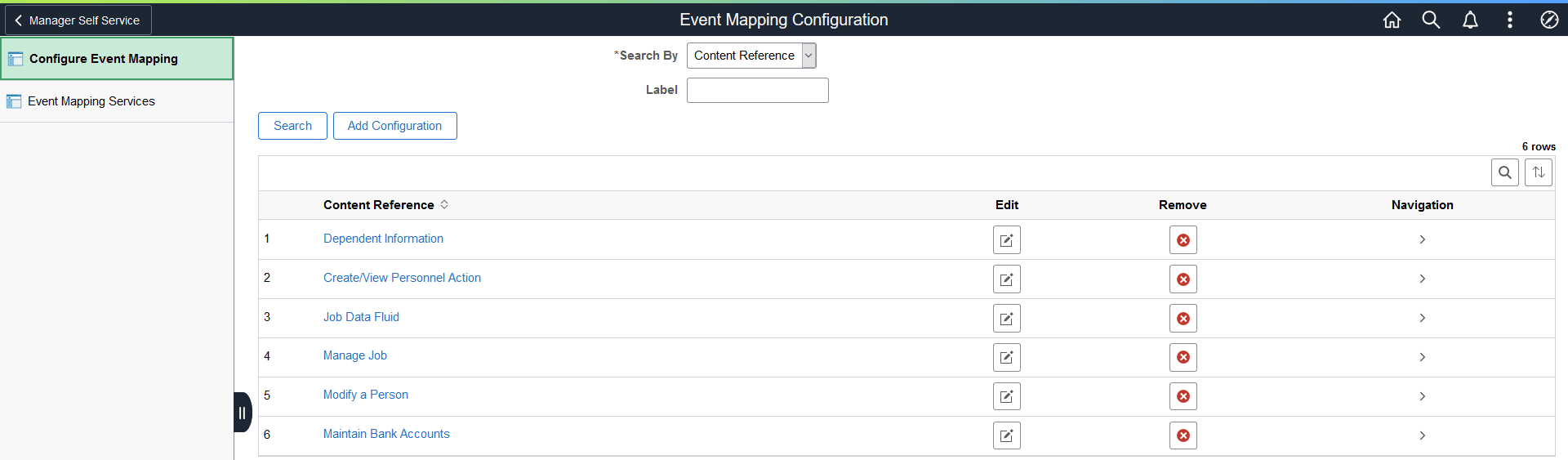
You can search for existing configurations by content reference label or by application package or class configured on the content reference.
| Field or Control | Description |
|---|---|
|
Search By |
Select either:
|
|
Label |
When Content Reference is selected as the search type, enter a string or partial string to search on. The search results include matches on the content reference label or description. |
|
Root Package IDPathClass ID |
When Application Class is selected as the search type, enter a portion of or the fully qualified path to the application class:
|
|
Search |
Click the Search button to execute the search. |
|
Add Configuration |
Click the Add Configuration button to access the Event Mapping Configuration page to search for a content reference and then add a new event mapping configuration. |
|
Content Reference |
Click a content reference link to access the actual transaction page, which allows you to test any configured PeopleCode programs. |
|
|
Click an Edit Configuration button to modify an existing event mapping configuration. |
|
|
Click a Remove Configuration button to remove an existing event mapping configuration. |
|
|
Click a Show Navigation Path button to display the full menu navigation path to the content reference. |


