Copying Related Content Service Definitions
Use the Copy Related Content Service Definition page to save the current service definition as a new service definition.
Navigation:
On the Define Related Content Service page, click the Copy Service Definition button.
This example illustrates the fields and controls on the Copy Related Content Service Definition page. You can find definitions for the fields and controls later on this page.
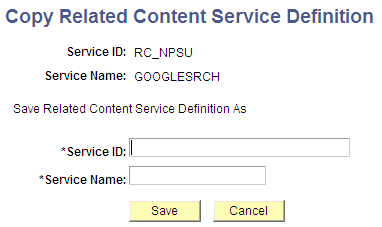
To copy a related content service definition:
-
Enter a new value in the Service ID field.
-
Enter a new value in the Service Name field.
-
Click the Save button.
A message appears indicating a successful save.
-
Click the OK button to dismiss the message box.
-
Click the Go to Related Content Service Definition link that appears to access the new related content service definition or click the Cancel button to close the dialog box.