Creating a Custom Activity Guide Data Type
Use the Define Activity Guide Data Type page to define custom activity guide data types.
Navigation:
This example illustrates the fields and controls on the Define Activity Guide Data Type page. You can find definitions for the fields and controls later on this page.
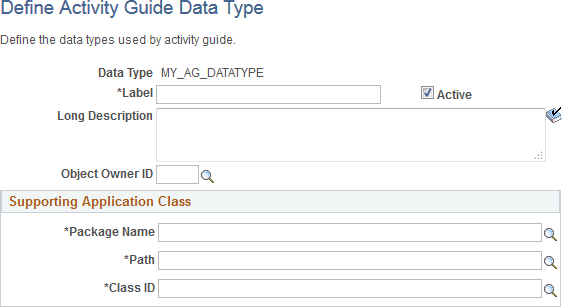
| Field or Control | Description |
|---|---|
|
Data Type |
Displays the identifier entered for the custom data type on the Add a New Value page. |
|
Label |
Enter the descriptive name for the custom data type. |
|
Long Description |
Enter a description for the custom data type. |
|
Object Owner ID |
Select the object owner ID. |
|
Package |
Enter the name of the application package that contains your custom application class. |
|
Path |
Enter the names of each subpackage in the application class hierarchy that define the location of the application class. Separate subpackage names by a colon. If the class is defined in the top-level application package, enter or select the colon. |
|
Class ID |
Enter the name of the application class that extends PTGP_GUIDED_PROCESS:DataSources:ActivityGuideDataSource base class. |
To implement a custom activity guide data type, create a PeopleCode application class definition:
-
Extend the PTGP_GUIDED_PROCESS:DataSources:ActivityGuideDataSource base class. For example:
import PTPP_PORTAL:UTILITY:Collection; import PTPP_COLLECTIONS:*; import PTGP_GUIDED_PROCESS:DataSources:*; import PTGP_GUIDED_PROCESS:GuidedProcesses:*; import PTGP_GUIDED_PROCESS:Elements:*; import PTGP_GUIDED_PROCESS:Buttons:*; import PTGP_GUIDED_PROCESS:Steps:*; class MyCustAGDataType extends PTGP_GUIDED_PROCESS:DataSources:ActivityGuideDataSource -
In the constructor method for your custom application class, set default values for only the properties necessary to differentiate it from the BaseDataSource class. For example:
method MyCustAGDataType /+ &pId as String +/ %Super = create PTGP_GUIDED_PROCESS:DataSources:ActivityGuideDataSource(&pId); %This.setDataSourceType("MyCustAGDataType"); %This.RenderType = %This.RENDER_TYPE_NONGUIDED_OPTIMIZED; /* Do not need to defer loading */ %This.DeferMainGroupletsLoading = False; end-method; -
Do not implement and thereby override the populateDataSourceObject method of PTGP_GUIDED_PROCESS:DataSources:ActivityGuideDataSource.
The populateDataSourceObject method loads critical activity guide template metadata.
-
Implement the initializeContainerComponent method manipulate the look of the container component using style sheets, JavaScript, or data source properties. For example:
method initializeContainerComponent /+ Extends/implements PTGP_GUIDED_PROCESS:DataSources:ActivityGuideDataSource.initializeContainerComponent +/ Local string &renderType, &scname; /* Call the super */ %Super.initializeContainerComponent(); /* Get the collection name */ &scname = %Request.GetParameter(&cstQUERYPARAMETER_SCNAME); If (All(&scname)) Then %This.CollName = &scname; End-If; /* Override render type */ &PTGP_NAVCOLL_RENDER_TYPE = ""; &renderType = %Request.GetParameter(&cstQUERYPARAMETER_RENDERTYPE); If (All(&renderType)) Then try %This.RenderType = &renderType; &PTGP_NAVCOLL_RENDER_TYPE = &renderType; catch Exception &e end-try; End-If; /* Override panel type */ %This.ShowSide1PanelCollapsible = True; %This.ShowSide1PanelOpenWhenCollapsible = ( Not %This.IsSmallFormFactorMode); end-method; -
Implement the initializeGroupletComponent method manipulate the look of the grouplet component using style sheets, JavaScript, or data source properties. While it must call the populateGuidedProcessObject to load the process tree, it must not load data source metadata. For example:
method initializeGroupletComponent /+ Extends/implements PTGP_GUIDED_PROCESS:DataSources:ActivityGuideDataSource.initializeGroupletComponent +/ Local string &scname; /* Override render type */ If (All(&PTGP_NAVCOLL_RENDER_TYPE)) Then %This.RenderType = &PTGP_NAVCOLL_RENDER_TYPE; End-If; /* Get the collection name */ &scname = %Request.GetParameter(&cstQUERYPARAMETER_SCNAME); If (All(&scname)) Then %This.CollName = &scname; End-If; %Super.initializeGroupletComponent(); end-method; -
Implement the populateGuidedProcessObject method to load the process tree from your custom data source. For example:
method populateGuidedProcessObject
   /+ Returns PTGP_GUIDED_PROCESS:GuidedProcesses:BaseGuidedProcess +/
   /+ Extends/implements PTGP_GUIDED_PROCESS:DataSources:ActivityGuideDataSource.populateGuidedProcessObject +/
   Local string &text, &iconUrl, &msgNode;
   Local string &defaultFolderIconUrl, &defaultContentIconUrl;
   Local boolean &succeeded;
   Local Record &rec;
   Local PTGP_GUIDED_PROCESS:GuidedProcesses:BaseGuidedProcess &thisProcess;
   Local PTGP_GUIDED_PROCESS:Elements:StepElement &thisStep;
   Local PTGP_GUIDED_PROCESS:Elements:StepGroupElement &thisStepGroup, &theRootStep;
   Local PTGP_GUIDED_PROCESS:Elements:ContextTextElement &headerText;
   Local PTGP_GUIDED_PROCESS:Elements:ButtonElement &thisButton;
   Local PTPP_COLLECTIONS:NavigationCollection &thisNavColl;
   Local PTPP_COLLECTIONS:Folder &thisFolder;
   Local PTPP_COLLECTIONS:Shortcut &thisShortcut;
   &thisProcess = create PTGP_GUIDED_PROCESS:GuidedProcesses:BaseGuidedProcess("PTGPTester");
   &theRootStep = &thisProcess.RootStep;
   Evaluate %This.RenderType
   When %This.RENDER_TYPE_HORIZONTAL
   When %This.RENDER_TYPE_VERTICAL_OPTIMIZED_SEQUENTIAL
   When %This.RENDER_TYPE_VERTICAL_NONOPTIMIZED_SEQUENTIAL
      &thisProcess.IsSequential = False;
      Break;
   When %This.RENDER_TYPE_VERTICAL_OPTIMIZED
   When %This.RENDER_TYPE_VERTICAL_NONOPTIMIZED
   When %This.RENDER_TYPE_NONGUIDED_OPTIMIZED
   When %This.RENDER_TYPE_NONGUIDED_NONOPTIMIZED
      Break;
   End-Evaluate;
   /* Default icons */
   &defaultFolderIconUrl = %Response.GetImageURL(Image.PTPP_FN_LARGE_FOLDER_ICN);
   &defaultContentIconUrl = %Response.GetImageURL(Image.PTPP_FN_LARGE_CONTENT_ICN);
   &rec = CreateRecord(Record.PTPP_SITE_OPT);
   &rec.PORTAL_NAME.Value = %Portal;
   If (&rec.SelectByKey()) Then
      /* Site default */
      &defaultFolderIconUrl = %Response.GetImageURL(&rec.PTPP_SCLGFLDICN.Value);
      &defaultContentIconUrl = %Response.GetImageURL(&rec.PTPP_SCLGCNTICN.Value);
   Else
      SQLExec("SELECT MSGNODENAME FROM PS_PTPP_OPTIONS", &msgNode);
      &rec = CreateRecord(Record.PTPP_OPTIONS);
      &rec.MSGNODENAME.Value = &msgNode;
      If (&rec.SelectByKey()) Then
         /* System default */
         &defaultFolderIconUrl = %Response.GetImageURL(&rec.PTPP_SCLGFLDICN.Value);
         &defaultContentIconUrl = %Response.GetImageURL(&rec.PTPP_SCLGCNTICN.Value);
      End-If;
   End-If;
   /* Get the Collection */
   try
      &thisNavColl = create PTPP_COLLECTIONS:NavigationCollection(%This.PortalName, %This.CollName);
   catch Exception &ex1
      /* Ignore any error */
   end-try;
   /* Generate the list */
   If ((&thisNavColl <> Null) And
         &thisNavColl.Authorized And
         &thisNavColl.IsValid) Then
      /* Root steps */
      If (&thisNavColl.Shortcuts <> Null) Then
         &thisShortcut = &thisNavColl.Shortcuts.First();
         While (&thisShortcut <> Null)
            /* Create the step */
            &thisStep = create PTGP_GUIDED_PROCESS:Elements:StepElement(&thisShortcut.Name);
            &thisStep.Label = UnEscapeHTML(&thisShortcut.Label);
            &thisStep.URL = &thisShortcut.AbsoluteContentURL;
            &thisStep.SequenceNumber = &thisShortcut.SequenceNumber;
            &thisStep.IsFluid = &thisShortcut.IsFluid;
            If (&thisShortcut.IsNewWindow) Then
               &thisStep.OnClick = "LaunchURL(null, '" | EscapeJavascriptString(&thisShortcut.AbsolutePortalURLnewWin) | "', 1);";
            End-If;
            If (&thisShortcut.IsTopWindow) Then
               &thisStep.OnClick = "LaunchURL(null, '" | EscapeJavascriptString(&thisShortcut.AbsolutePortalURL) | "', 4);";
            End-If;
            &iconUrl = &thisShortcut.ImageURL;
            If (All(&iconUrl)) Then
               &thisStep.IconUrl = &iconUrl;
            Else
               &thisStep.IconUrl = &defaultContentIconUrl;
            End-If;
            &theRootStep.addChildStep(&thisStep);
            /* Next shortcut */
            &thisShortcut = &thisNavColl.Shortcuts.Next();
         End-While;
      End-If;
      /* Root folders */
      If (&thisNavColl.Folders <> Null) Then
         &thisFolder = &thisNavColl.Folders.First();
         While (&thisFolder <> Null)
            /* Create the step group */
            &thisStepGroup = create PTGP_GUIDED_PROCESS:Elements:StepGroupElement(&thisFolder.Name);
            &thisStepGroup.Label = UnEscapeHTML(&thisFolder.Label);
            &thisStepGroup.SequenceNumber = &thisFolder.SequenceNumber;
            &iconUrl = &thisFolder.ImageURL;
            If (All(&iconUrl)) Then
               &thisStepGroup.IconUrl = &iconUrl;
            Else
               &thisStepGroup.IconUrl = &defaultFolderIconUrl;
            End-If;
            /* First level child steps */
            If (&thisFolder.Shortcuts <> Null) Then
               &thisShortcut = &thisFolder.Shortcuts.First();
               While (&thisShortcut <> Null)
                  /* Create the step */
                  &thisStep = create PTGP_GUIDED_PROCESS:Elements:StepElement(&thisShortcut.Name);
                  &thisStep.Label = UnEscapeHTML(&thisShortcut.Label);
                  &thisStep.URL = &thisShortcut.AbsoluteContentURL;
                  &thisStep.SequenceNumber = &thisShortcut.SequenceNumber;
                  &thisStep.IsFluid = &thisShortcut.IsFluid;
                  &thisStepGroup.addChildStep(&thisStep);
                  If (&thisShortcut.IsNewWindow) Then
                     &thisStep.OnClick = "LaunchURL(null, '" | EscapeJavascriptString(&thisShortcut.AbsolutePortalURLnewWin) | "', 1);";
                  End-If;
                  If (&thisShortcut.IsTopWindow) Then
                     &thisStep.OnClick = "LaunchURL(null, '" | EscapeJavascriptString(&thisShortcut.AbsolutePortalURL) | "', 4);";
                  End-If;
                  /* Next shortcut */
                  &thisShortcut = &thisFolder.Shortcuts.Next();
               End-While;
            End-If;
            /* Sort and add the step group when it's not empty */
            If (&thisStepGroup.ChildSteps.Count > 0) Then
               &succeeded = &thisStepGroup.ChildSteps.sort(&cstSEQ_NUMBER, True);
               &theRootStep.addChildStep(&thisStepGroup);
            End-If;
            /* Next folder */
            &thisFolder = &thisNavColl.Folders.Next();
         End-While;
      End-If;
      /* Sort the root list */
      &succeeded = &theRootStep.ChildSteps.sort(&cstSEQ_NUMBER, True);
      /* Set the current step id to the first item */
      &thisStep = &theRootStep.ChildSteps.get(1);
      If (All(&thisStep)) Then
         &thisStepGroup = (&thisStep As PTGP_GUIDED_PROCESS:Elements:StepGroupElement);
         If (All(&thisStepGroup)) Then
            &thisProcess.CurrentStepId = &thisStepGroup.ChildSteps.get(1).ID;
         Else
            &thisProcess.CurrentStepId = &thisStep.ID;
         End-If;
      End-If;
      /* Header texts */
      &headerText = create PTGP_GUIDED_PROCESS:Elements:ContextTextElement("label");
      &headerText.StyleClass = "ps_ag-header-context-title";
      &headerText.Text = &thisNavColl.Label;
      &thisProcess.addHeaderText(&headerText);
      &text = &thisNavColl.Description;
      If (All(&text)) Then
         &headerText = create PTGP_GUIDED_PROCESS:Elements:ContextTextElement("description");
         &headerText.StyleClass = "ps_ag-header-context-text";
         &headerText.Text = &text;
         &thisProcess.addHeaderText(&headerText);
      End-If;
      /* Header buttons */
      &thisButton = create PTGP_GUIDED_PROCESS:Buttons:ExitButton(&thisProcess.ID | "-ExitButton");
      &thisProcess.addHeaderButton(&thisButton);
      &thisButton = create PTGP_GUIDED_PROCESS:Buttons:PreviousButton(&thisProcess.ID | "-PreviousButton");
      &thisProcess.addHeaderButton(&thisButton);
      &thisButton = create PTGP_GUIDED_PROCESS:Buttons:NextButton(&thisProcess.ID | "-NextButton");
      &thisProcess.addHeaderButton(&thisButton);
   End-If;
   Return &thisProcess;
end-method;