Creating and Managing Dashboards
Use the Manage Dashboard Pages page to manage dashboard definitions:
-
Use the Classic Dashboards page (PTAL_DASHBD_PAGES) to manage classic dashboard definitions.
-
Use the Fluid Dashboards page (PTAL_FLDASHBDPAGES) to manage fluid dashboard definitions.
Navigation:
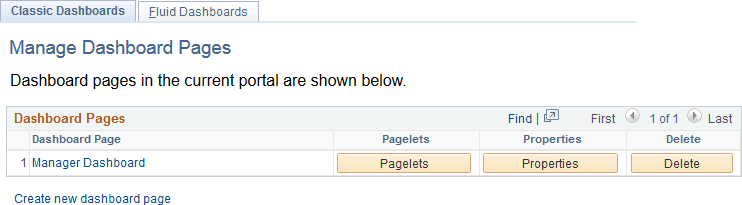
This example illustrates the fields and controls on the Classic Dashboards: Manage Dashboard Pages page. You can find definitions for the fields and controls later on this page.
| Field or Control | Description |
|---|---|
|
Create new dashboard page |
Click to access the Dashboard Page Administration page and configure the properties of a new dashboard definition. |
|
Dashboard Page |
Displays an active link to the dashboard itself. Click the link to access the dashboard. |
|
(Classic only) Pagelets |
Click to configure the content and layout of a classic dashboard. |
|
(Fluid only) Tiles |
Click to configure the content of a fluid dashboard. |
|
Properties |
Click to access the Dashboard Page Administration page and specify dashboard properties, location, and security details. |
|
Delete |
Click to remove the dashboard content reference definition from the portal registry. |