Specifying Dashboard Properties
Use the Dashboard Page Administration page (PTAL_DASHBD_ADMIN) to specify dashboard properties including the dashboard’s location in the menu structure.
Navigation:
On the Manage Dashboard Pages page:
-
Click the Create new dashboard page link.
-
Click the Properties button for an existing dashboard definition.
This example illustrates the fields and controls on the Dashboard Page Administration page. You can find definitions for the fields and controls later on this page.
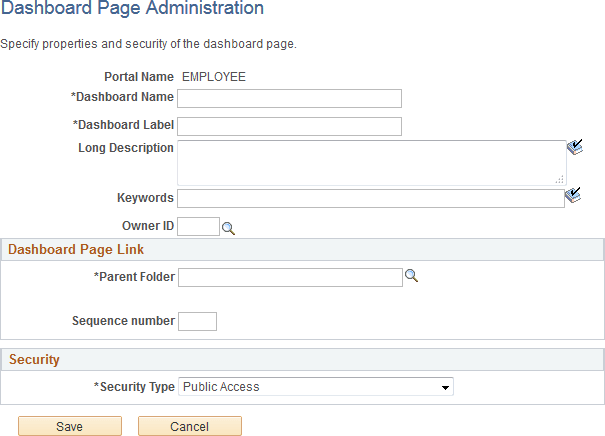
Enter the following dashboard properties:
| Field or Control | Description |
|---|---|
|
Dashboard Name |
Enter a unique identifier for the dashboard. This field is required. |
|
Dashboard Label |
Enter the label that appears in the navigation. This field is required. |
|
Long Description |
Enter a description that appears as the tool tip text. |
|
Keywords |
Enter a keyword or keyword phrase to be stored as a content reference attribute. Note: Two content reference attributes are created: KEYWORD (to store the keywords in the base language) and KEYWORD_LNG (to store the keywords in the current session language). See Defining Content References for more information on content reference attributes. |
|
Owner ID |
Select the organization that owns the object. |
Dashboard Page Link
Use these fields to specify the location of the dashboard page link in the menu structure.
| Field or Control | Description |
|---|---|
|
Parent Folder |
Enter the name of the navigation folder in which you want to place the dashboard page link. Click the look up button to access the Select the Dashboard Link Parent Folder page. |
|
Sequence number |
Enter a number to specify the order of the dashboard link within the parent folder. |
Security
Use the fields in the Security group box to specify whether access to the dashboard is restricted by permission list and role or unrestricted and available to all users.
| Field or Control | Description |
|---|---|
|
Security Type |
Select from these values:
|
Selected Security
Insert rows into the Selected Security grid to specify the permission lists and roles that provide access to the dashboard. You can combine permission lists and roles by inserting multiple rows in the grid.
| Field or Control | Description |
|---|---|
|
Type |
For each row, select from these values:
|
|
Name |
Specify the permission list or role name that provides access to the dashboard. Click the look up button to see a list of available names. |
|
Save |
Click to save the configuration and return to the Manage Dashboard Pages page. |
|
Cancel |
Click to discard any changes and return to the Manage Dashboard Pages page. |