Creating and Styling Sections
Sections are an important construct in advanced sectionalized homepage development. This topic briefly describes the process of creating sections and points you to existing documentation. Additionally, this topic describes the various visual forms for sections and points to the styles and CSS variables delivered for this purpose.
Creating a Section
You can create a section either using the Section Assignments tab on the Content Ref Administration page or you can create section templates and import them.
Refer to the following topics for more information on creating sections: (Fluid only) Creating Sections on Fluid Homepages and Managing Section Templates and Sections.
Designing Visual Forms of Sections
You use the delivered styles and CSS variables applicable at the level of a section to add granular styling to the section. The styles and CSS variables are described in the preceding topics. Based on your business requirements, you can style sections to span the entire width of the homepage or style sections such that they grow vertically or horizontally as you add tiles in the section, or you can lay the sections side-by-side.
Additionally, you can design each sections to be unique in its look and feel by applying specific background color, border, icon, and so on.
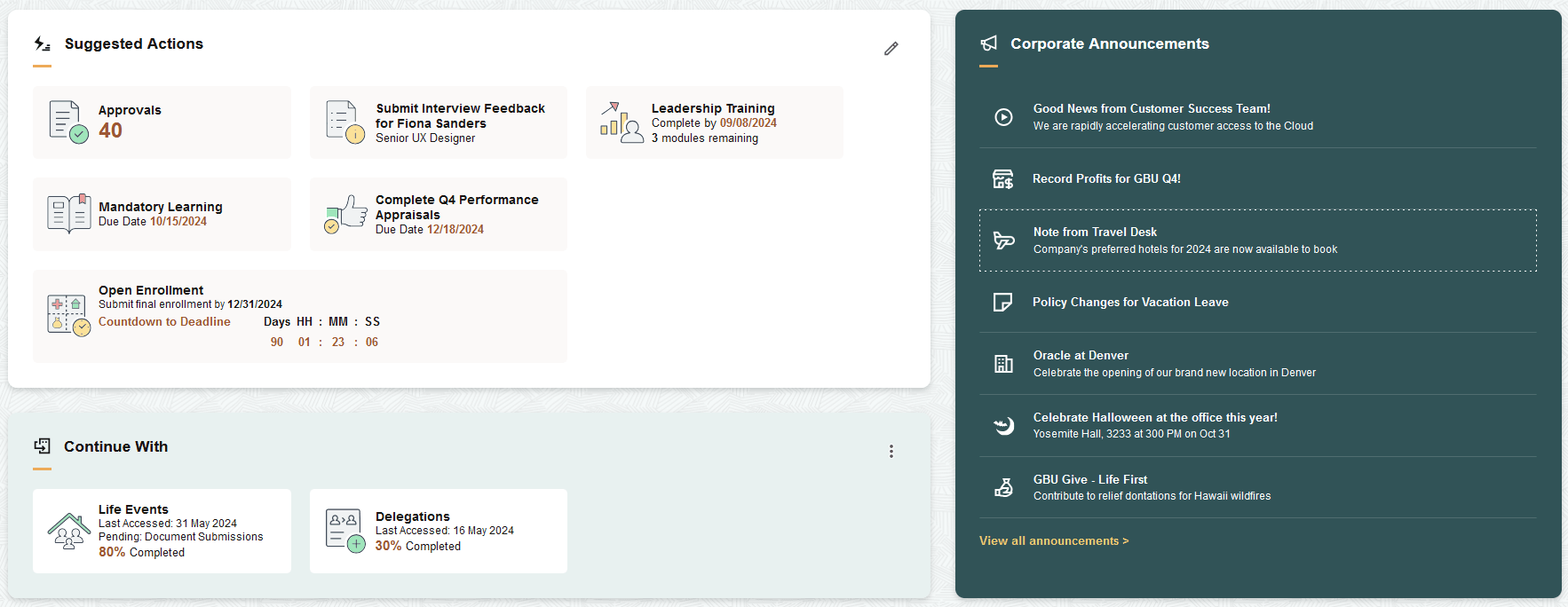
The following example shows some of the visual forms of sections.
This example illustrates some of the visual forms of sections.
Adjusting Section Height to Enable Vertical Scrolling
When you want to enable vertical scrolling for users to scroll through the tiles, you should complete the following steps:
-
At the landing page or homepage content reference level (CREF), add a style in the PS_STYLECLASSES section attribute: psc_section-content-scrollable.
-
In the custom landing page or section stylesheet, set the CSS variable --pt-section-content-max-height to the desired value.
Sample CSS to set the value:
This CSS, for example, allows the section content (the tiles within) to grow to a maximum height of 17 character units. Once that size is reached, the section presents a vertical scroll bar for access to the other tiles which are outside of the visible area. This allows the section content to only grow to a given height.
.pt_homepage:not(.persmode) .tab-PTDMO_LANDING_SAMPLE {
    & .sect-PTFAVORITES { /*Section: Favorites */
        --pt-section-content-max-height: 17ch;
    }
}