Creating the UPK-Based Service Definition
To create the UPK-based service definition:
-
Create a new related-content service definition.
Choose a naming convention that makes UPK service definitions easily identifiable, for example UPK_<service_definition_name>
-
Enter the service name and description.
-
Select Non-PeopleSoft URL as the URL type.
-
In the External URL field, enter the URL to your kp.html file.
It should look similar to this: http://myupksite.com/upk/mycontent/dhtml_kp.html?Guid=5cd5ba9f-c3a8-441f-923b-a8aca7e95b6e&Mode=D
-
Click the Test Related Content Service link.
The Test Related Content Service page opens.
-
On the Test Related Content Service page, click the Test Related Content Service link.
-
Click the Return button to go back to the Define Related Content Service page.
-
For conceptual information, select the New Window check box to give the administrator the ability to enable the new window functionality for the user.
-
In the Select security options group box, select the Public Access check box.
-
Click the Save button.
Note:
UPK-based service definitions do not require additional parameters.
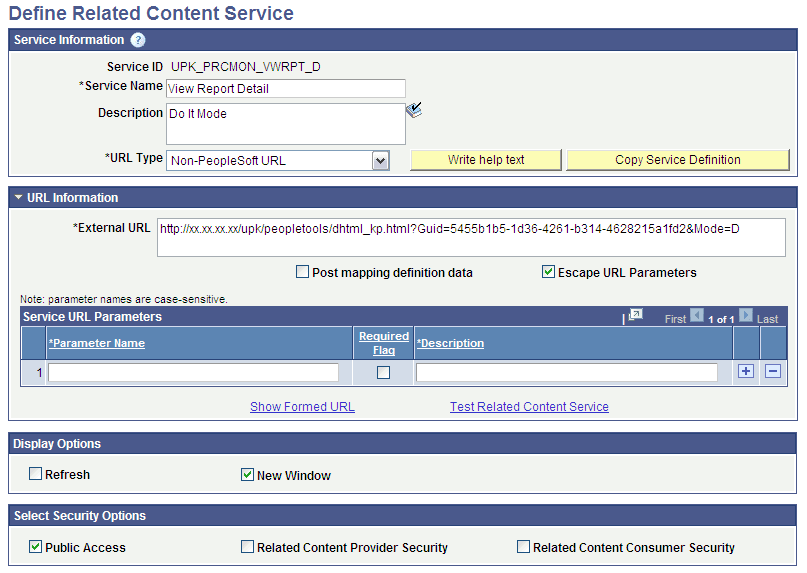
This example illustrates how a completed service definition shows an external URL that accesses UPK content in Do It mode:
Note:
You can use the Copy Service Definition button to clone this definition and save time creating new UPK-based service definitions.
Related Topics