Defining Content Reference Links
Access the Select a Content Reference or Content Reference Link page (Select Navigate the portal registry hierarchy into the parent folder in which you want the link to appear. Click the Add Content Reference Link link that appears after the Content References group box.)
The following example illustrates the Select a Content Reference or Content Reference Link page.
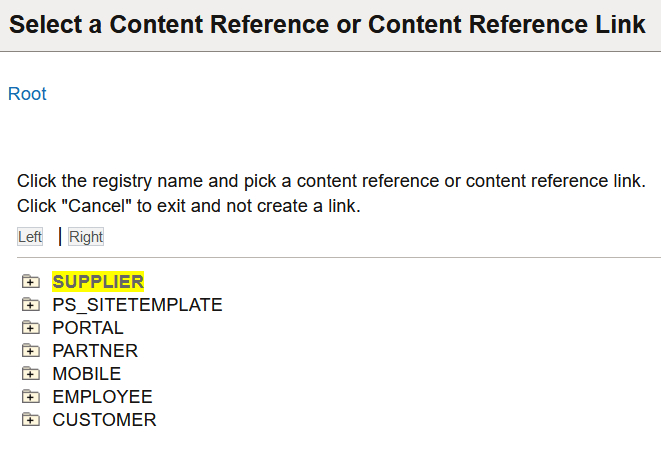
Click the folder icons to navigate the tree structure until you find the target of the link. Click the link and the Content Reference Link Administration page appears.
The following example illustrates the Content Reference Link Administration page.
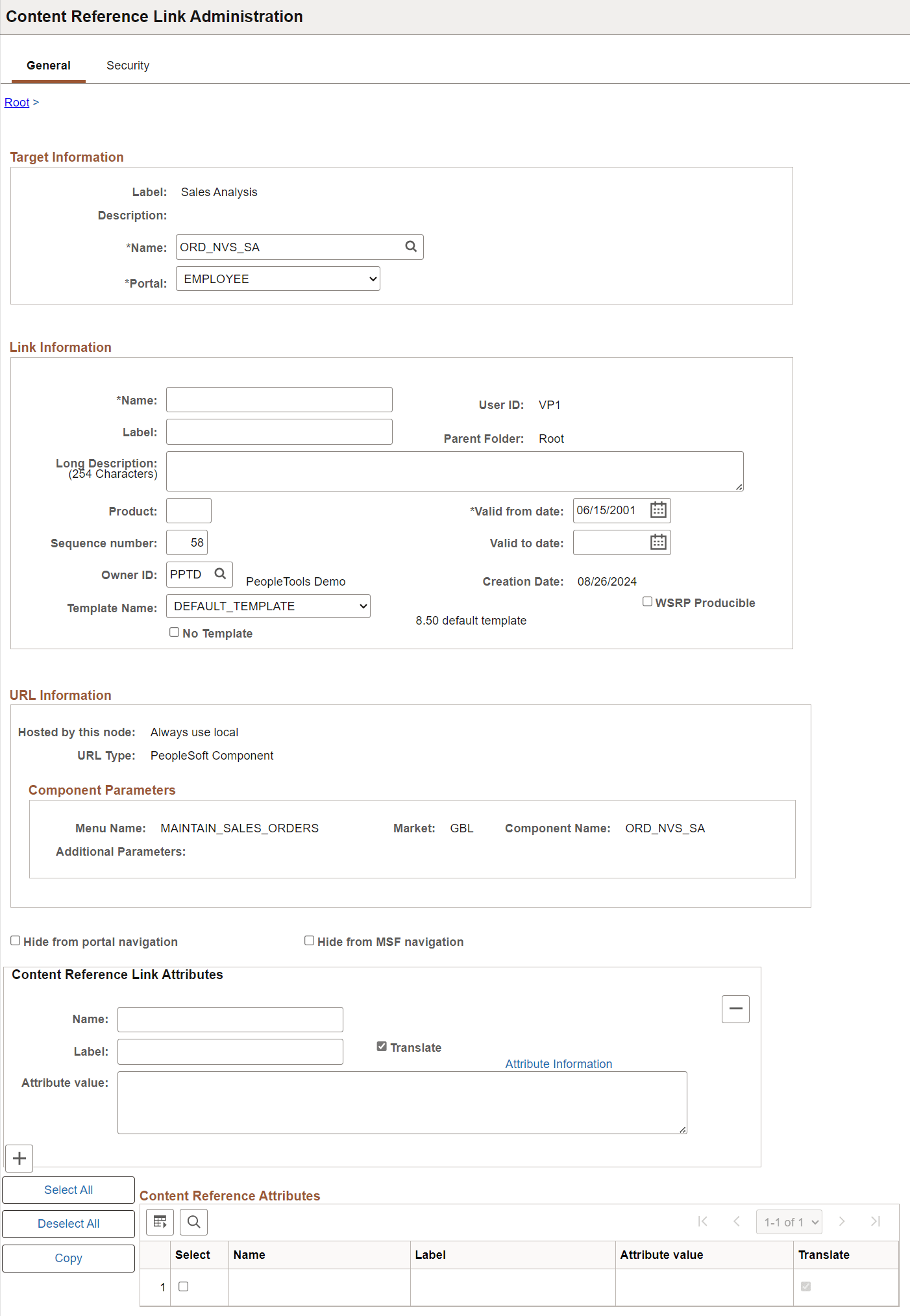
PeopleSoft portals store content references based on their URLs, so you can't register two different content references that specify the same URL. Content reference links overcome this limitation by enabling you to define more than one menu item that invokes a given URL. You define a content reference link like any other content reference, but instead of specifying a URL, you specify an existing content reference as its destination. At runtime, clicking the content reference link on the portal menu connects to the destination content reference by URL.
Note:
To the user, a content reference link looks and works the same as a content reference on the portal menu.
A content reference link can point to:
-
A content reference of usage type Target.
-
Another content reference link.
You can define a content reference link in the same locations that you can define a content reference of usage type Target. Multiple content reference links can connect to a single destination content reference.
By connecting one content reference link to another content reference link, you can create a chain of redirection, which always ends in a content reference of usage type Target. You don’t need to know what the ultimate destination is when you define your new content reference link, and you can duplicate the property settings of the content reference link to which it connects rather than those of the ultimate destination. However, Oracle recommends that you limit your use of chains of content reference links because they impose processing overhead on your portal when selected.
WARNING:
If you delete a destination content reference or content reference link, all content reference links that connect to it are also deleted. This behavior propagates back through any content reference link chain.
Target Information
| Field or Control | Description |
|---|---|
|
Name |
Select the destination content reference to which you want this content reference link to connect. |
|
Portal |
Select the portal that contains the destination content reference to which you want this content reference link to connect. The Always use local value refers to the portal where the content reference link is defined, so moving or copying it to a different portal changes the resolution of this value. Important: If you change this value, you must also select a new link content reference. |
Link Information
| Field or Control | Description |
|---|---|
|
Name |
Enter a unique object name for this content reference link. This field is required. |
|
Test Content Reference Link |
Click to test this content reference link. Clicking this button should produce the same result as clicking the content reference link from the portal menu. |
If you omit values in following fields, their values are inherited from the destination content reference:
-
Label.
-
Long Description.
-
Product.
-
Sequence number.
-
Object owner identifier.
-
No Template.
-
Template Name.
-
Valid from date.
-
Valid to date.
URL Information
These fields are display-only and reflect the URL information of the content reference that you are linking to.
See “URL Information” in Defining Content References.
Content Reference Attributes
If the destination content reference has defined content reference attributes, they appear in this grid. You can copy them from the grid to the Content Reference Link Attributes group box using the following page elements:
| Field or Control | Description |
|---|---|
|
Select |
Select to designate a content reference attribute for copying to the Content Reference Link Attributes group box. |
|
Select All |
Click to designate all content reference attributes for copying to the Content Reference Link Attributes group box. |
|
Copy |
Click to copy the selected content reference attributes to the Content Reference Link Attributes group box. |
Content Reference Link Attributes
Content reference link attributes and content reference attributes share the same page fields.
You can define content reference link attributes directly in this group box, or you can copy an attribute from the destination content reference using the Content Reference Attributes grid, and modify it to suit your purposes.
At runtime, the content reference link attributes defined here are combined with the content reference attributes defined at the link destination, and they are applied together.
Important:
If a content reference link attribute defined here has the same name as a content reference attribute defined at the link destination, but a different attribute value, the value defined here takes precedence and is applied at runtime.
Content reference link attributes are independent and separate from the content reference attributes at the link destination. Modifying one has no effect on the other.