Defining Data Types
Access the Define Data Types page. (Select .)
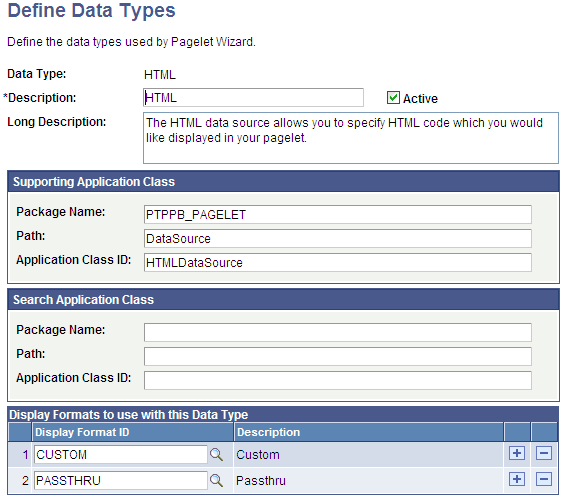
This example illustrates the fields and controls on the Define Data Types page. You can find definitions for the fields and controls later on this page.
Pagelet Wizard is delivered with the following data type definitions to support their associated data sources:
-
ACTIVITY_GUIDE data type enables you to generate activity guide pagelets.
-
FREE_TEXT data type allows you to generate pagelets from any complex, free-form HTML or text.
-
HTML data type allows you to generate pagelets from any simple, formatted HTML code.
-
IBCONNECTOR data type interacts directly with connectors registered to the Integration Broker and secured using Define IB Connector Security within Pagelet Wizard. This data type should be used only when it is not desirable to use the Integration Broker data type.
-
IBDATASOURCE data type retrieves messages using Integration Broker. Specifically, it uses outbound synchronous messages to retrieve data from external sources.
-
NAVIGATION_COLLECTION data type enables you to display navigation collections within the context of a pagelet.
-
OBIEE data type interacts directly with the analytics server.
-
PIVOTGRID data type enables you to display pivot tables and charts in pagelets.
-
PSQUERY data type enables you to use PeopleSoft Query to create database queries on records and fields within the PeopleSoft system.
-
ROWSET data type is used with embedded pagelets. Rowsets can exist within components.
-
SEARCHREC data type displays the search box or the search results from a given component.
-
URL data type retrieves data from external sources such as the internet. This includes sources such as news feeds.
WARNING:
Do not alter delivered field values for these data types.
See Understanding Pagelet Wizard Data Sources.
| Field or Control | Description |
|---|---|
|
Data Type |
Enter the internal name that you want to assign to the data type. |
|
Description |
Enter a short description of the data type. This short description appears as the prompt list value when you select data sources in Pagelet Wizard. |
|
Active |
Select to activate the data type and make it a selectable value in Pagelet Wizard. If you deactivate a data type, the data type is no longer available for selection on the Select Data Source page. If you deactivate a data type that is in use, associated pagelets do not display data. The pagelets display an error message instead. |
|
Long Description |
Enter a detailed description of the data type. This long description appears as the data type description on the Select Data Source page in Pagelet Wizard. |
Supporting Application Class
The application class specified here refers to the PeopleCode that implements the data type. This is the code that Pagelet Wizard calls to retrieve the data for the pagelet.
This table describes the Supporting Application Class fields:
| Field or Control | Description |
|---|---|
|
Package Name |
Enter the name of the application class package that you want to use for the data type. |
|
Path |
Enter the names—delimited by colons—of each subpackage in the hierarchy that drills down to the class that contains the method that defines the data type. |
|
Application Class ID |
Enter the name of the application class that you want to use for the data type. The class must exist in the application package name that you specify. |
Note:
The search option of each pagelet has to be explicitly declared through this page or Pagelet Wizard to activate the search box, even for Inline XSL type of search box.
Search Application Class
The application class specified here refers to the PeopleCode that implements a default pagelet search for this data type. This is the code that Pagelet Wizard calls to build and place the search box in the pagelet, perform the search, and render and format the search results.
Changes to the default search application class at the data type level appear in any pagelet of this data type automatically the next time the pagelet is rendered, with the exception of the pagelets for which you define a custom search application class. Examples of these changes are included in the subsequent list.
-
Changing the code in the search class.
-
Adding a new search class.
-
Removing a search class.
-
Replacing a search class.
The PTPPB_PAGELET:PageletSearch:PortalSearch sample search application class is part of a standard PeopleTools installation. This class uses the portal registry index to perform the search. You can use this sample search class to test the pagelet search functionality for any pagelet or you can associate this search class with either a pagelet data type or with a pagelet.
Note:
Pagelet search is supported for homepage and embedded pagelets only.
This table describes the Search Application Class fields:
| Field or Control | Description |
|---|---|
|
Package Name |
Enter the Search application class package name that you want to use for the data type. |
|
Path |
Enter the names—delimited by colons—of each subpackage in the hierarchy that drills down to the class that contains the method to define the search. |
|
Application Class ID |
Enter the name of the Search application class that you want to use for the data type. The class must exist in the application package name that you specify. |
Display Formats to Use with This Data Type
| Field or Control | Description |
|---|---|
|
Display Format ID |
Enter the display formats that are supported by the data type. You can select from existing display formats defined on the Define Display Formats page. |
|
View Document Type Definition (DTD) |
Click to access the Document Type Definition (DTD) page, where you can access the DTD that describes the XML generated by the selected data type. |
Viewing the Document Type Definition (DTD)
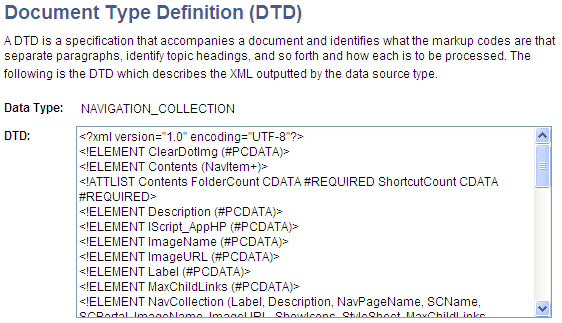
The Document Type Definition (DTD) page enables you to view the tags and attributes that are used to describe content in the XML from the data source type. This information is useful when you use third-party tools to generate XSL templates for the data type.
This example illustrates a DTD specification on the Document Type Definition (DTD) page.