Defining Display Formats
Access the Define Display Formats page. (Select .)
This example illustrates the fields and controls on the Define Display Formats page. You can find definitions for the fields and controls later on this page.
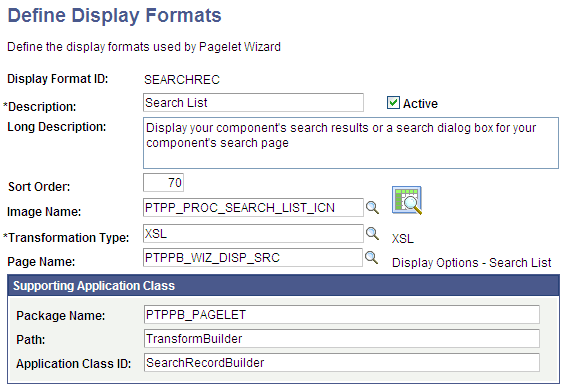
A display format performs the following tasks:
-
Defines a transformation builder, which is code that builds a particular type of display format (chart, menu, list, and so forth).
-
Identifies the proper transformation to use with pagelets created with a specific display format builder.
For example, the chart display format defines the code that builds charts, and it specifies that Pagelet Wizard must use the XSL transformation for pagelets created using this display format.
Pagelet Wizard is delivered with the following display format definitions to support their associated display formats:
-
CHART
-
CUSTOM
-
LIST
-
MENU
-
PASSTHRU
-
SEARCHREC
-
TABLE
WARNING:
Do not alter delivered field values for these display formats.
See Understanding Pagelet Wizard Display Formats.
| Field or Control | Description |
|---|---|
|
Display Format ID |
Enter the name that you want to assign to the display format. |
|
Description |
Enter a short description of the display format. This short description appears as the display format name value on the Select Display Format page in Pagelet Wizard. |
|
Active |
Select to activate the display format and make it a selectable value in Pagelet Wizard. If you deactivate a display format, the display format is no longer available for selection on the Select Display Format page when accessed for associated data types. Existing pagelets that have been created by means of a deactivated display format are unaffected; however, you can no longer use Pagelet Wizard to change the display settings for those pagelets. |
|
Long Description |
Enter a detailed description of the display format. This long description appears as the display format description on the Select Display Format page in Pagelet Wizard. |
|
Sort Order |
Enter a numeric value to specify the order in which you want the display format to appear as a selectable field value relative to other display formats on the Select Display Format page. |
|
Image Name |
Select the image that you want to appear with the display format name and description on the Select Display Format page. |
|
Transformation Type |
Display formats use a transformation technology. Select the transformation type that you want to use for the display format. Available transformation types are defined on the Define Transform Types page. |
|
Page Name |
Enter the object name of the page to be used to define display options for this display format. This page must exist in the PTPPB_WIZARD component in PeopleSoft Application Designer. |
Supporting Application Class
The application class specified here refers to the PeopleCode that implements the display format. This code is the builder that creates the definition that Pagelet Wizard uses (along with the transformation) to display the pagelet.
| Field or Control | Description |
|---|---|
|
Package Name |
Enter the application class package name to use for the display format. |
|
Path |
Enter the names—delimited by colons—of each subpackage in the hierarchy that drills down to the class that contains the method used to create the display format. |
|
Application Class ID |
Enter the name of the application class to use for the display format. The class must exist in the application package name that you specify. |