Defining Navigation Collection Registry Options
Access the Registry Options page. (Select .)
This example illustrates how to manage values in the Registry Options page. Most of the values in this page can be overridden by a defined collection.
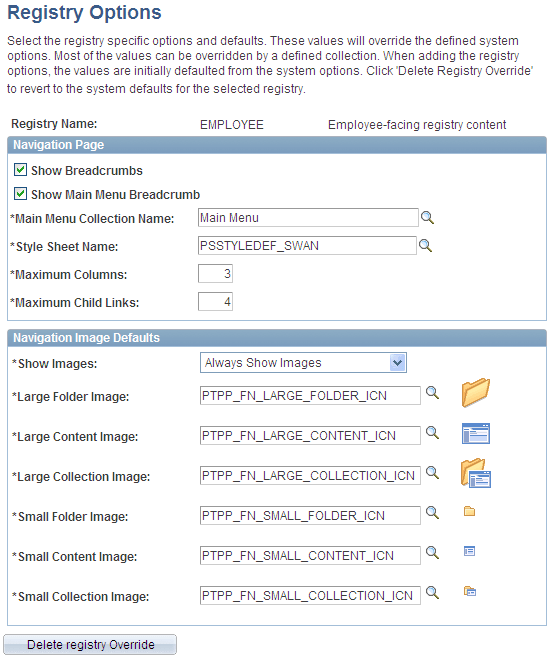
All options that you set on this page override defaults defined at the system level on the System Options page.
See Understanding Navigation Collection Options.
| Field or Control | Description |
|---|---|
|
Registry Name |
Select the portal registry for which you want to define navigation collection options that will override system-level defaults. |
Navigation Image Defaults
| Field or Control | Description |
|---|---|
|
Show Images |
Always Show Images: Select if you always want images to appear on navigation pages and pagelets accessed by means of the selected portal registry. Never Show Images: Select if you never want images to appear on navigation pages and pagelets accessed by means of the selected portal registry. Only Show Defined Images: Select if you want only specifically defined images to appear on navigation pages and pagelets accessed by means of the selected portal registry. If you select this option, only images defined as a part of the navigation collection or defined on the source reference are displayed on the navigation pages and pagelets. System-level and registry-level default images are not displayed. |
|
Large Folder Image |
Select the image that you want to display for top-level folders on a Navigation page or pagelet accessed by means of the selected portal registry. |
|
Large Content Image |
Select the image that you want to display for top-level content references on a Navigation page or pagelet accessed by means of the selected portal registry. |
|
Large Collection Image |
Select the image that you want to display for top-level navigation collection references on a Navigation page or pagelet accessed by means of the selected portal registry. |
|
Small Folder Image |
Select the image that you want to display for a folder within a folder on a Navigation page or pagelet accessed by means of the selected portal registry. |
|
Small Content Image |
Select the image that you want to display for a content reference within a folder on a Navigation page or pagelet accessed by means of the selected portal registry. |
|
Small Collection Image |
Select the image that you want to display for a navigation collection within a folder on a Navigation page or pagelet accessed by means of the selected portal registry. |
|
Delete Registry Override |
Click to revert the portal registry's navigation collection options to the system-level defaults defined on the System Options page. |