Defining User Attribute Types
Use the Define User Attribute Types page to create and maintain the types of user attributes to be used in branding theme assignments. Each user attribute type is mapped to a supporting PeopleCode application class definition.
Navigation:
This example illustrates the fields and controls on the Define User Attribute Types page.
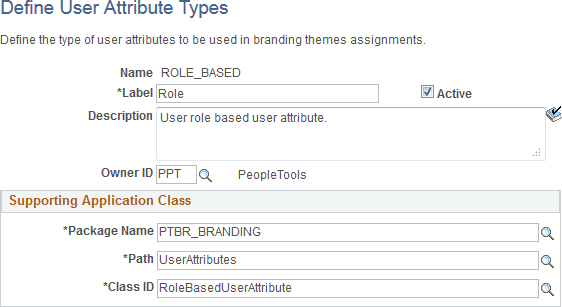
| Field or Control | Description |
|---|---|
|
Name |
Displays the unique identifier for this user attribute type. |
|
Label |
Enter a short name for the user attribute type, which will be displayed when this type is selected to be used in a theme assignment. |
|
Active |
This check box is selected by default. Deselect this check box to make the user attribute type inactive. An inactive user attribute type cannot be selected for use in a branding theme assignment. Moreover, existing theme assignments with inactive user attribute types are ignored. |
|
Description |
Enter a description for the user attribute type. |
|
Owner ID |
Select which product, feature, or application owns this user attribute type definition. |
|
Package Name |
Select the name of the application package that contains the application class that defines this user attribute type. |
|
Path |
Select the names of each subpackage in the application class hierarchy that define the location of the application class. Separate subpackage names by a colon. If the class is defined in the top-level application package, enter or select the colon. |
|
Class ID |
Select the name of the application class that defines this user attribute type. |
|
Add to Project |
Click the Add to Project link to access the Add To Project page to insert this branding element type definition into an ADS project. See Lifecycle Management Guide: Adding Data Set Instances from Object Designer Pages and Migrating Branding Data Using ADSs for more information. |
Related Topics