Deploying Classic-Only Activity Guides
Classic activity guides are deployed on a WorkCenter page, which is where they can be accessed by users. Prior to creating a WorkCenter page where the activity guide will be deployed, you must first generate a pagelet for the pagelet area of the WorkCenter page. This pagelet will present the action items to the user in list form.
Depending on whether you want to tie the activity guide pagelet to a specific activity guide instance or to dynamically create the activity guide instance, there are three approaches for generating the activity guide pagelet:
-
Provide the template ID, but not the instance ID, which allows the instance to be obtained or generated at runtime. At runtime, the required context data is passed as query string parameters in the WorkCenter URL as name-value pairs. If an activity guide instance exists for this context data, then it is retrieved. Otherwise, a new activity guide instance will be created dynamically.
You can use the Publish as Pagelet task in the Setup Activity Guide WorkCenter to generate an activity guide pagelet of this type, which is typically all that is required in most circumstances. Alternatively, you can use Pagelet Wizard to generate this type of activity guide pagelet.
-
Provide both the template ID and the activity guide instance ID, which creates a pagelet tied to an existing activity guide instance.
You must use Pagelet Wizard to generate an activity guide pagelet of this type. The template ID is specified as a data source identifier in step 2 of Pagelet Wizard; the instance ID is specified as a data source parameter in step 3.
-
Do not provide either the template ID or the activity guide instance ID, which generates an empty, generic activity guide pagelet that can be used to generate any instance from any activity guide template at run time.
You must use Pagelet Wizard to generate an activity guide pagelet of this type. At run time, the template ID is passed as a data source parameter to the pagelet and the context data is provided as query string parameters in the WorkCenter URL as name-value pairs. This will create the activity guide instance dynamically.
Using the Setup Activity Guide WorkCenter to Generate an Activity Guide Pagelet
Use the Publish as Pagelet page to publish an activity guide pagelet with a template ID, but without an instance ID.
Important:
The Publish as Pagelet page is available for non-optimized activity guides only. However, while the Setup Activity Guide WorkCenter will present the option to generate a pagelet and configure a WorkCenter for all non-optimized activity guide templates, it should not be used for activity guide templates that include fluid components.
Navigation:
-
-
Open a non-optimized template in the Setup Activity Guide WorkCenter:
-
Click the title link for the template.
-
Click the Properties link for the template.
-
-
Click the Publish as Pagelet task.
This example illustrates the fields and controls on the Publish as Pagelet page. You can find definitions for the fields and controls later on this page.
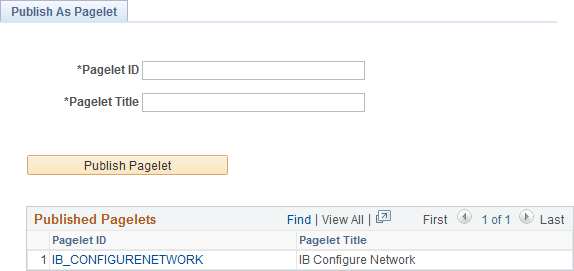
| Field or Control | Description |
|---|---|
|
Pagelet ID |
Enter an ID for the pagelet definition. |
|
Pagelet Title |
Enter a title for the pagelet, which will appear in the pagelet's title bar. |
|
Publish Pagelet |
Click the Publish Pagelet button to create the pagelet definition. |
|
Pagelet ID (link) |
Click the Pagelet ID link to open the pagelet definition in Pagelet Wizard in a new browser window (or tab). |
Using Pagelet Wizard to Generate an Activity Guide Pagelet
You must use Pagelet Wizard to generate an activity guide pagelet for these two scenarios:
-
When you need to provide both the template ID and the activity guide instance ID, which creates a pagelet tied to an existing activity guide instance.
-
When you do not want to provide either the template ID or the activity guide instance ID, which generates an empty, generic activity guide pagelet that can be used to generate any instance from any activity guide template at runtime.
When specifying a display format in step 4 of Pagelet Wizard, select the Passthru format. When specifying publication options in step 6 of Pagelet Wizard, always publish an activity guide pagelet as a template pagelet. Activity guide pagelets should not be made available or used as homepage pagelets. In addition, activity guide pagelets cannot be consumed as WSRP content.