Deploying Optimized and Non-Optimized Fluid Activity Guides
To deploy optimized and non-optimized fluid activity guides, you must manually create an access mechanism that invokes the fluid activity guide start page component (PT_AGSTARTPAGE_NUI). This access mechanism must:
-
Pass the activity guide template ID as a query string parameter.
-
Pass any required context parameters defined as runtime parameters as query string parameters.
Note:
Any required context parameters defined as system variables are supplied automatically and do not have to be passed as query string parameters.
Methodologies for creating access mechanisms include:
-
Manually creating a content reference definition for a tile in the tile repository.
-
Manually creating a content reference definition for a menu item in the portal menu structure.
-
Creating a “jump” (or launch) page to collect required context data from the user. Then, pass the data as query string parameters when invoking the fluid activity guide start page component via a link or button.
Regardless of the methodology you choose, the following special characters are not recommended in context parameter values as they have special meaning in URLs: # & ? + = : % /
Additional restrictions may apply if other special characters are not acceptable in the components configured as action items—for example, the space character is not acceptable in key values for certain components. You may see errors in the target component when such restricted characters are used in context parameter values.
If you create a launch page, use the EncodeUrlForQuerystring built-in PeopleCode function to encode the context parameter values. For example:
&ctxtParams = &ctxtParams | "&CONTEXTIDPARAMS=" | &ctxtObj.fieldname | ":" | EncodeURLForQueryString(&ctxtObj.keyValue);Manually Creating a Content Reference Definition
When creating a content reference definition to invoke the fluid activity guide start page component:
-
Select the following options on the General page:
-
No Template
-
Fluid Mode
-
Display on Small Form Factor
-
-
Set the node name to LOCAL_NODE.
-
Select the PeopleSoft Generic URL URL type.
-
Enter the following as the beginning of the Portal URL field:
c/NUI_FRAMEWORK.PT_AGSTARTPAGE_NUI.GBL -
Append the template ID as a query string parameter as follows:
?CONTEXTIDPARAMS=TEMPLATE_ID:template_ID -
Append any additional required runtime parameters as query string parameters similar to the following:
&CONTEXTIDPARAMS=PARAM_NAME:Value -
If the activity guide should not be accessible via the Back button—for example, after the user has completed the activity guide instance and exited—then append the following URL parameter:
&AgInHistory=NNote:
This URL parameter is also valid for fluid navigation collections.
In the following example,
the Portal URL field includes the template ID (MY_AG01LLL) and a required
runtime parameter (COMPANY) with its runtime value (Company_Name).
The complete Portal URL field is defined as:
c/NUI_FRAMEWORK.PT_AGSTARTPAGE_NUI.GBL?CONTEXTIDPARAMS=TEMPLATE_ID:MY_AG01LLL&CONTEXTIDPARAMS=COMPANY:Company_Name

The following example displays a tile definition to display a navigation collection and links as an optimized non-guided non-sequential activity guide.
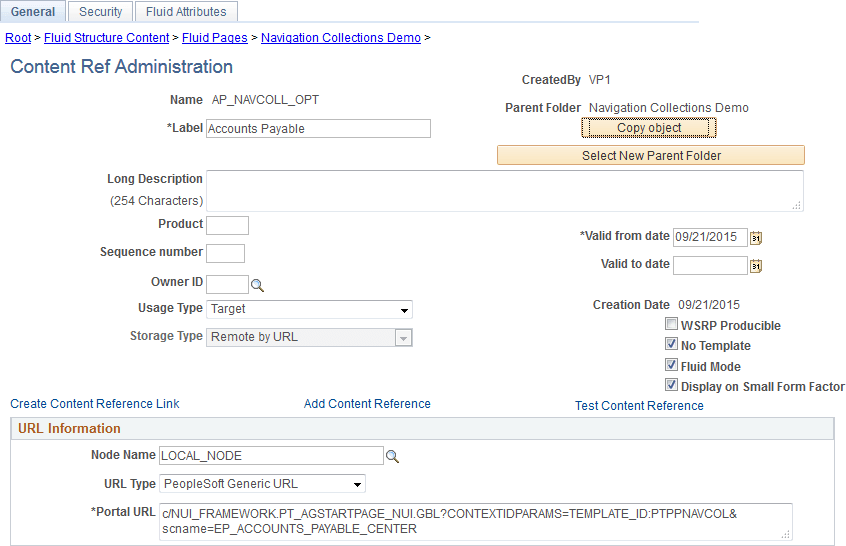
Note:
While the Template Properties: Properties page includes a group box to publish the template as a tile, this tile definition will include the template ID only, and no context data or instance IDs. Therefore, users who use this tile will be redirected to the My Activity Guide Instances page, on which they can select from a list of existing activity guides instances generated from the template for which they have contributor privileges. Therefore, this group box cannot be used as a general deployment mechanism or to generate new activity guide instances. See Defining Activity Guide Template Properties for more information.