Finding Existing Navigation Collections
Access the Find an Existing Collection page. (Select .)
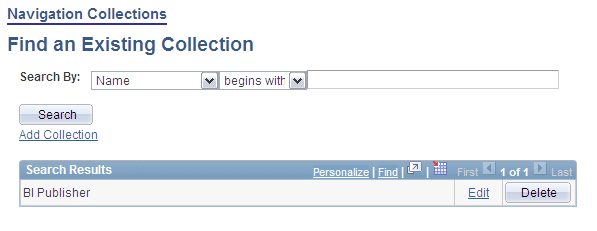
This example illustrates the fields and controls on the Find an Existing Collection page. You can find definitions for the fields and controls later on this page.
| Field or Control | Description |
|---|---|
|
Search by |
Select one of these values: Description: Select to conduct your search based on navigation collection description text. Name: Select to conduct your search based on navigation collection name text. Use the begins with and contains options to limit your search results. |
|
Add Collection |
Select to access the Maintain Collection page, where you can define a new navigation collection. |
Search Results
| Field or Control | Description |
|---|---|
|
Edit |
Select to access the Maintain Collection page, where you can edit an existing navigation collection. |
|
Delete |
Click to delete the existing navigation collection. You are prompted with the Navigation Collections - Delete Confirmation page, where you can confirm or cancel the deletion of the navigation collection. Note: The Delete button does not appear for the Main Menu navigation collection. While you can edit this navigation collection, you should not delete it because the Main Menu navigation collection is used by the system as a default page to display when it encounters certain errors. Displaying the Main Menu rather than an error page enables you to continue to navigate through your system. |