Identifying HTML Field IDs
To participate in interwindow communication as a triggering field, as the acted upon field, or as a message data field, the HTML field must have a value for the id attribute, and this value must be unique within the HTML page domain. You can use your browser's built-in developer tools to examine the HTML code for a page and to extract the value of the id attribute for a field. Developer tools are available as part of Chrome, Firefox, and Safari. In addition, there are third-party add-ons (for example, Firebug) that provide an alternative toolset for web developers.
In the following example showing the web developer tools integrated into Firefox, the Search button in the Customer Information pagelet has been selected.
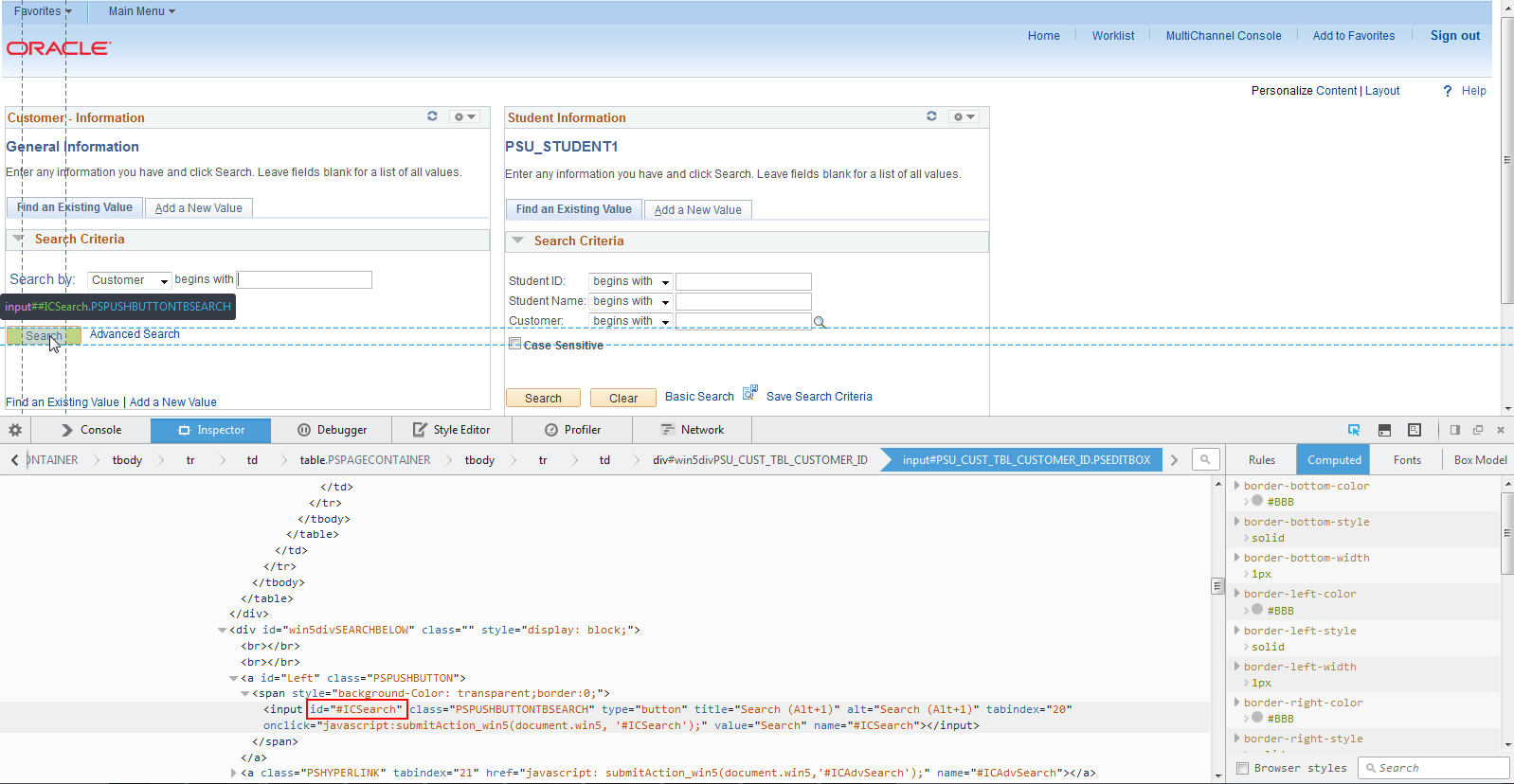
In developer tools pane at the bottom of the browser window, the corresponding line of code has been highlighted by the web developer tool:
<input id="#ICSearch" class="PSPUSHBUTTONTBSEARCH" type="button" title="Search (Alt+1)" alt="Search (Alt+1)" tabindex="20"
onclick="javascript:submitAction_win5(document.win5, '#ICSearch');" value="Search" name="#ICSearch"></input>
Within that line of
HTML code, the id attribute and its value (#ICSearch) has
been enclosed in a red rectangle:
id="#ICSearch"