Publishing Interwindow Communication Messages
Use the IWC Message Events page to define interwindow communication publication and subscription events.
Navigation:
-
PeopleTools, Portal, Inter Window Communication.
-
Navigate to the content reference definition:
-
PeopleTools, Portal, Structure and Content.
-
Browse through the folder hierarchy in the portal registry.
-
Click the Edit link for a content reference definition.
-
Click the IWC Message Events link.
-
This example illustrates the fields and controls on the IWC Message Events page for a publication event.
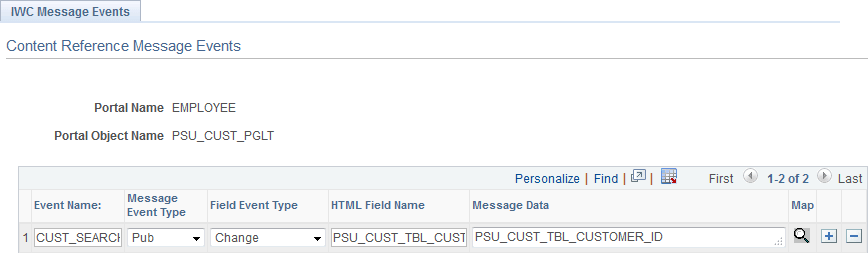
To create an interwindow communication publication message:
-
In the Event Name field, enter a name for this message. Because messages are subscribed to by event name only, this value should be unique for all messages defined within this portal.
-
Select Pub as the message event type.
-
Select either Change or Click as the field event type.
-
In the HTML Field Name field, enter the HTML field ID of the triggering field as it appears in the HTML source.
Important:
To participate in interwindow communication as the triggering field, as the acted upon field, or as a message data field, the HTML field must have a value for the id attribute, and this value must be unique within the HTML page domain. See Identifying HTML Field IDs for more information.
-
Enter the HTML field ID of the field (or fields) that you want to publish as the message data. Separate multiple field IDs with a comma.
Note:
The triggering field and the message data field are not necessarily the same field.
-
Save your changes.
Note:
While the Map button is displayed for all interwindow event definitions, the Map button is active only for push notification event subscriptions of type Server Sub. See Special Uses of Interwindow Communication.