Subscribing to Interwindow Communication Messages
Use the IWC Message Events page to define interwindow communication publication and subscription events.
This example illustrates the fields and controls on the IWC Message Events page for a subscription event.
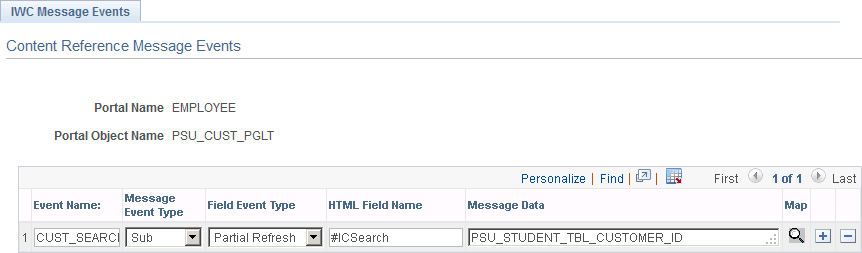
To subscribe to an interwindow communication message:
-
In the Event Name field, enter the name of the message as it was defined in the publication event.
-
Select Sub as the message event type.
-
Select either Full Refresh or Partial Refresh as the field event type.
Important:
For iScript and Pagelet Wizard pagelets, a full refresh is the only valid event type.
-
In the HTML Field Name field for a partial refresh subscription only, enter the HTML field ID of the acted upon field as it appears in the HTML source.
Important:
For a full refresh subscription, the field to be acted upon is required to be blank.
Important:
To participate in interwindow communication as the triggering field, as the acted upon field, or as a message data field, the HTML field must have a value for the id attribute, and this value must be unique within the HTML page domain. See Identifying HTML Field IDs for more information.
-
In the Message Data field, enter the HTML field ID of the field (or fields) that you want to receive the message data. Specify receiving fields in the same order as the message data is defined in the publishing message; separate multiple fields IDs by a comma.
Note:
For a full refresh subscription, the message data field is optional.
-
Save your changes.
Note:
While the Map button is displayed for all interwindow event definitions, the Map button is active only for push notification event subscriptions of type Server Sub. See Special Uses of Interwindow Communication.