Interwindow Communication Process Flow
Interwindow communication interactions occur according to this simplified process flow:
-
The triggering event occurs (click or change).
-
The interwindow communication message is published.
-
Each object (pagelet or page) determines whether it is subscribed to the message.
-
Subscriber objects only read the message.
-
Subscriber objects only act according to the subscription definition.
The following diagram presents the flow of these actions and events, which comprise the publish and subscribe process of interwindow communication:
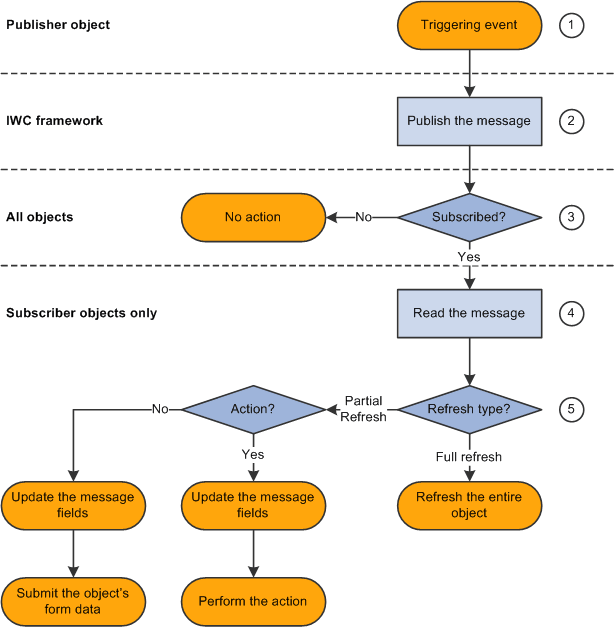
The following table presents the process flow in more detail:
| Actor | Step | Description |
|---|---|---|
|
Publisher object |
1. Triggering event occurs. |
User clicks a button or link or changes the value of a field that is configured for publication. |
|
Interwindow communication framework |
2. Publish the message. |
A simple string formatted message is sent to the top window in the browser session—for example, that would be the homepage or dashboard window. |
|
All objects |
3. Determine whether subscribed. |
All objects determine whether they are subscribed to the event. |
|
Subscriber objects only |
4. Read the message. |
All objects in the window that are subscribed to the event read the message. |
|
Subscriber objects only |
5. Act according to the subscription definition. |
Objects in the window that are subscribed to the event do one of the following:
|
Note:
Interwindow processes occur after any application server interactions invoked by the user's action. For example, a publication event could be defined for clicking a link, which merely retrieves data from the database, or it could be defined for clicking a Save button, which invokes component save processing to save updated data to the database. Interwindow communication fires after the server interaction returns to the browser.