Interwindow Communication
Interwindow communication (IWC) is a frame-to-frame messaging mechanism that enables browser window objects—such as pages or pagelets—to be aware of and react to field-level data changes that occur in other browser window objects that share the same browser session. Interwindow communication enables you to publish field-level changes as they occur so that any subscribing page or pagelet becomes instantly aware of the change and then, can act on it in real time.
Interwindow communication does not depend on any specific portal template, frame, or iframe and works throughout PeopleSoft applications in many scenarios for which you require interaction between browser window objects. You can configure interwindow communication to operate between pagelets, between the page and a pagelet, and also within the same pagelet, if necessary. Although interwindow communication is ideal for use with related content and WorkCenter pages, interwindow communication is independent of both technologies. In addition, interwindow communication does not depend on Integration Broker.
In a simple example, a dashboard includes the Employees pagelet, which contains a list of employee names. The dashboard also includes an Employee Projects pagelet, which contains the project listing for a specific employee. Interwindow communication enables you to click a name in the Employees pagelet and simultaneously have the Employee Projects pagelet retrieve the project listing for the selected employee.
In a different example, interwindow communication can be used to refresh a pagelet with data that has been updated in the database. For example, the target content area of a WorkCenter displays transactions related to the benefits enrollment process. The pagelet area of the WorkCenter includes a Benefits Summary pagelet that itemizes the cost to the employee of each benefit selection. When the employee saves a benefit selection on a transaction page in the WorkCenter, standard component processing saves the data to the database. When the server processing returns, the interwindow communication publish event fires indicating that a user action has occurred. The Benefits Summary pagelet subscribing to this event performs a full refresh to retrieve the revised data from the database.
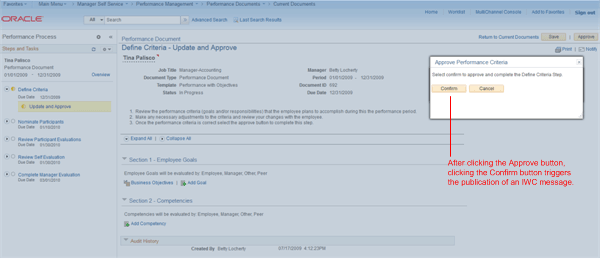
In the following example from a performance management WorkCenter, a publication event on the transaction page causes a full pagelet refresh in the pagelet area. The WorkCenter page displays a document for approval. After clicking the Approve button, the action of clicking the Confirm button triggers the publication of an interwindow communication message.
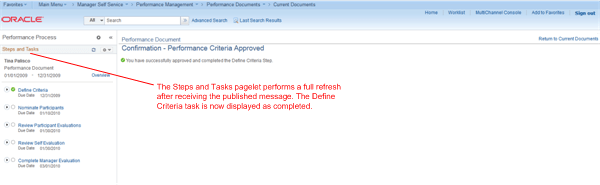
The Steps and Tasks pagelet on the left has subscribed to this interwindow communication message and performs a full refresh after receiving the published message. The Define Criteria task in the pagelet now shows that it has been completed: