Managing WorkCenter Dashboards
Access the Manage WorkCenter Dashboard Pages page. (Select .)
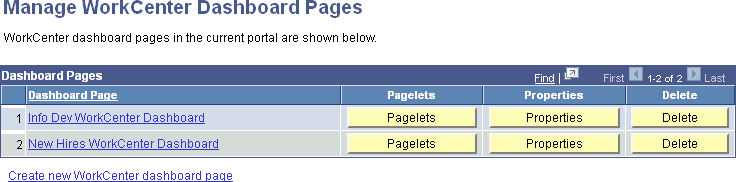
This example illustrates the fields and controls on the Manage WorkCenter Dashboard Pages page. You can find definitions for the fields and controls later on this page.
| Field or Control | Description |
|---|---|
|
Dashboard Page |
Displays the content reference name as an active link. Click to access the content reference and view the WorkCenter dashboard page. |
|
Pagelets |
Click the Pagelets button to configure the layout of the dashboard. See Configuring the Layout of WorkCenter Dashboards. |
|
Properties |
Click the Properties button to administer the properties for the dashboard page. See Creating WorkCenter Dashboards. |
|
Delete |
Click the Delete button to delete the dashboard page. |
|
Create new WorkCenter dashboard page |
Click the link to create a new WorkCenter dashboard. See Creating WorkCenter Dashboards. |